PICO-N150A
Carte mère Pico-ITX Intel N150 avec mémoire DDR5 monocanal
- A2+ 36 A3- 37 A2- 38
- CLK1- GND GND
Carte mère Pico-ITX Intel N150 avec mémoire DDR5 monocanal
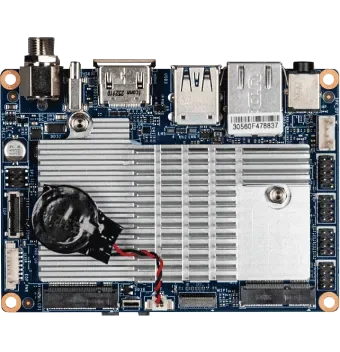
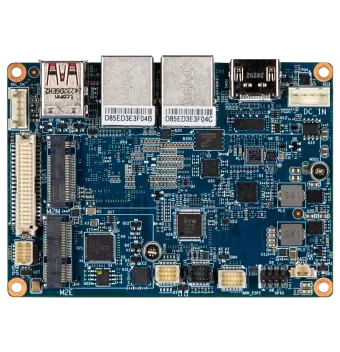
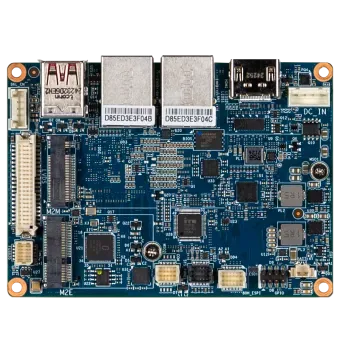
La carte mère Pico-ITX GigaIPC PICO-N150A intègre un processeur Intel N150 à 4 cœurs et 2 ports GbE, pour les applications embarquées compactes en format PICO-ITX.
Présentation. La GigaIPC PICO-N150A est une carte mère de type Pico-ITX au format 100 x 72 mm, équipée du processeur Intel® Processor N150 (4 cœurs, jusqu'à 3,60 GHz, TDP 6 W) et d'un socket FCBGA1264.
Mémoire et graphisme. Un emplacement SO-DIMM DDR5 accepte jusqu'à 16 Go en mode monocanal, avec des modules DDR5 4800 MHz. Le processeur graphique intégré Intel® Graphics gère une sortie HDMI 2.0 jusqu'à 4096 x 2160 @60 Hz et une sortie LVDS jusqu'à 1920 x 1200 @60 Hz, soit deux affichages indépendants.
Connectivité. Deux ports GbE LAN (Realtek® RTL8111H) sont disponibles, ainsi que deux ports USB 3.2 Gen 2x1, un port HDMI et un connecteur COM RS-232/422/485 en interne. Deux en-têtes USB 2.0, un en-tête GPIO 4 bits et un en-tête de contrôle de rétroéclairage complètent les interfaces.
Extensions. Un emplacement M.2 2280 M-Key (PCIe Gen 3x2) et un emplacement M.2 2230 E-Key (PCIe x1, USB 2.0) permettent d'ajouter stockage et modules sans fil.
Alimentation et environnement. L'alimentation se fait par un connecteur 4 broches (+12 VDC). La plage de fonctionnement s'étend de 0 °C à 60 °C, avec une humidité de 20 à 95 % sans condensation. Le module de sécurité TPM 2.0 (INFINEON SLB9670VQ2.0) est intégré.
Usages et intégration. Le port COM RS-232/422/485 et les GPIO permettent de raccorder des équipements de terrain et des automates. Le système d'exploitation supporté est Windows 11 IoT Enterprise LTSC 2024 (24H2) x64.
Aucune question publiée sur cette référence pour l'instant. Les questions sont relues avant publication.
Retrouvez toutes les caractéristiques enregistrées pour PICO-N150A, avec leur origine. Utilisez les filtres pour trouver rapidement l'information voulue.
| Caractéristique | Valeur |
|---|---|
| Facteur de forme | PICO-ITX 100W x 72Dmm |
| A2+ 36 A3- 37 A2- 38 | CLK1- GND GND |
| Administrator Password | To set up Administrator's password Minimum length : 3 Maximum length : 20 |
| BIOS Lock | Enable/Disable BIOS Lock function Enabled : Enables BIOS Lock function (Default setting) Disabled : Disabled BIOS Lock funtion |
| BIOS Version | Shows the BIOS version of the system |
| Boot Option Priorities | Shows the information of the storage that be installed in the system Choose/set the boot priority |
| Build Date and Time | Shows the Build Date and Time when the BIOS was created. |
| Built-in EFI Shell | Enabled : Enables Built-in EFI Shell Disabled : Disables Built-in EFI Shell (Default setting) |
| C states | Command CPU to enter into low power consumption mode when CPU is under idle mode. Enabled : Enables CPU C states function (Default setting) Disabled : Disables CPU C states function |
| CPU | Intel® Processor N150 Intel 7, 4 cores, up to 3.60 GHz TDP 6W |
| CPU Temperature | Shows current CPU temperature |
| Definition Pin No. | Definition |
| Discard Changes and Reset | Choose this option to reboot the system without saving any changes Yes : Agree to discard changes and reset No : Cancel to discard changes and reset |
| DVMT Pre Allocated | Use DVMT Pre-Allocated to set the amount of system memory which is installed to the integrated graphics processor Option items : 32M , 64M, 128M, 256M (Default setting) |
| Enroll Cert | Press [Enter] to configure advanced items : Server CA Configuration : Enroll Cert : 1. Enroll Cert Using File 2. Cert GUID : Input digit character in 11111111-2222-3333-4444-1234567 890ab format. 3. Commit Changes and Exit 4. Discard Changes and Exit |
| Enroll Efi Image | Allow the image to run in Secure Boot mode |
| Enter | Execute command or enter the submenu |
| ESC | Exit the BIOS Setup program |
| Ethernet | 2 x GbE LAN Ports (Realtek® RTL8111H) |
| Emplacements d'extension | 1 x 2280 M.2 M-Key (PCIe Gen 3x2) 1 x 2230 M.2 E-Key (PCIe x1, USB 2.0) |
| Export Secure Boot variables | Copy NVRAM content of Secure Boot variables to files in a root folder on a file system device |
| F1 | General Help |
| F2 | Previous Values |
| F3 | Load Optimized Defaults Settings |
| F4 | Save changes & Exit the BIOS Setup program |
| Factory Key Provision | Install factory default Secure Boot keys after the platform reset and while the system is in Setup mode Enabled : Enables Factory Key Provision (Default setting) Disabled : Disables Factory Key Provision |
| Full Screen LOGO Show | Enable/Disable full screen LOGO show on POST screen Enabled : Enables Full screen LOGO Show on POST screen Disabled : Disables Full screen LOGO Show on POST screen (Default setting) |
| In-Band ECC Support | Enable or Disable In-Band ECC Support function. Disabled : Disables In-Band ECC Support (Default setting) Enabled : Enables In-Band ECC Support |
| Intel® Speed Shift Technology | Enabled : Enables Intel® Speed Shift Technology (Default setting) Disabled : Disables Intel® Speed Shift Technology |
| Intel® Speedstep™ | Enabled : Enables Intel® Speedstep™ (Default setting) Disabled : Disables Intel® Speedstep™ |
| Intel (VMX) Virtualization Technology | Virtualization enhanced by Intel® Virtualization Technology will allow a platform to run multiple operating systems and applications in independent partitions. With virtualization, one computer system can function as multiple virtual systems. Enabled : Enables Intel Virtualization Technology (Default setting) Disabled : Disables Intel Virtualization Technology |
| Internal I/O | 1 x 4-pin box power connector (+12VDC) 1 x Front panel header 1 x COM header (RS-232/422/485) 2 x USB 2.0 headers 1 x GPIO (4-bits) header 1 x Backlight Control header |
| IPv4 HTTP Support | When Network stack is enabled : Disabled : Disables Ipv4 HTTP Support Enabled : Enables Ipv4 HTTP Support (Default setting) |
| IPv4 PXE Support | When Network stack is enabled : Disabled : Disables Ipv4 PXE Support Enabled : Enables Ipv4 PXE Support (Default setting) |
| IPv6 HTTP Support | When Network stack is enabled : Disabled : Disables Ipv6 HTTP Support Enabled : Enables Ipv6 HTTP Support (Default setting) |
| IPv6 PXE Support | When Network stack is enabled : Disabled : Disables Ipv6 PXE Support Enabled : Enables Ipv6 PXE Support (Default setting) |
| Key Management | Enables expert users to modify Secure boot policy variables without full authentication Press <Enter> to configure the advanced items |
| LAN1 MAC Address | Shows LAN1 MAC Address information |
| LAN2 MAC Address | Shows LAN2 MAC Address information |
| LVDS Support | Disabled : Disables LVDS Support (Default setting) Enabled : Enables LVDS Support |
| Me FW Image Re-Flash | Enable/Disable Me FW image re-flash function Enabled : Enables Me FW image re-flash function Disabled : Disables Me FW image re-flash function (Default setting) |
| ME FW version | Shows ME firmware version |
| Mémoire | 1 x DDR5 SO-DIMM socket, Max. Capacity 16 GB Support Single Channel DDR5 4800 MHz memory modules |
| Motherboard | PICO-N150A |
| MS UEFI CA Key | Enabled : Enables MS UEFI CA Key (Default setting) Disabled : Disables MS UEFI CA Key |
| Network Stack | When system is power on, install LAN driver under UEFI mode Disabled : Disables UEFI Network Stack (Default setting) Enabled : Enables UEFI Network Stack |
| Onboard LAN1 Onboard LAN2 | Enable/Disable onboard LAN controller Enabled : Enables onboard LAN controller (Default setting) Disabled : Disables onboard LAN controller |
| Operating Properties | Operating temperature: 0°C to 60°C Operating humidity: 60°C @ 20-95% (non-condensing) Non-operating temperature: -40°C to 85°C Non-operating humidity: 85°C @ 95% (non-condensing) |
| Order Information | 9MTWN1AJMR-SI (Box packing) |
| OS Compatibility | Windows 11 IoT Enterprise LTSC 2024(24H2) (x64) |
| Packing Content | Carton size: 384 x 251 x 211 (mm) Packing Capacity: 20pcs Single Box size: 168 x 112 x 34 (mm) |
| Pending operation | None : No execution will be conducted (Default setting) TPM clear : Set to clear data on TPM |
| PICO-N150A MB | 1 |
| PIN No. | 2x5pin header, pitch 1.0mm |
| Platform Key (PK) | These items allows you to enroll factory defaults or load Certificates from a file. |
| Project name | Shows Project name information |
| Rear I/O | 2 x USB 3.2 Gen 2x1 2 x RJ45 LAN Ports 1 x HDMI |
| Reset To Setup Mode | Yes : Agree to setup mode No : Cancel to setup mode |
| Restore AC Power Loss | To set which option the system should returns if a sudden power loss occured Power off : Do not power on when the power is back (Default setting) Power on : System power on when the power is back Last state : Restore the system to the state before power loss occures |
| Restore defaults | Restore/Load default values for all the setup options Yes : Agree to load optimized defaults No : Cancel to load optimized defaults |
| Restore Factory Keys | To restore factory settings Yes : Agree to restore factory settings No : Cancel to restore factory settings |
| Save Changes and Reset | After configuring all the options that you wish to change, choose this option to save all the changes and reboot the system Yes : Agree to save and reset No : Cancel to save and reset |
| Secure Boot | Press <Enter> to configure the advanced items |
| Secure Boot Mode | Standard : Standard mode Custom : Custom mode (Default setting) |
| Security Device Support | Enabled : Enables TPM feature (Default setting) Disabled : Disables TPM feature |
| Serial Port 1 Configuration | Press [Enter] to configure advanced items : Enable or Disable Serial Port Enabled : Enables Serial Port function (Default setting) Disabled : Disables Serial Port function Device settings : Display the specified Serial Port base I/O address and IRQ COM Port Mode : Choose RS-232, RS-422, or RS-485 feature |
| Socket | 1 x FCBGA1264 |
| Super IO Chip | Shows Super I/O chip model |
| System Date | Set the Date for the system (Format : Week - Month - Day - Year) |
| System Temperature | Shows current System temperature |
| System Time | Set the time for the system (Format : Hour - Minute - Second) |
| Total Memory | Shows the total memory size of the installed memory |
| TPM | Onboard TPM 2.0 security chip INFINEON SLB9670VQ2.0 |
| TPM Device Selection | PTT : Internal TPM dTPM : External TPM (When using External TPM module or having TPM chip on MB)(Default setting) |
| Turbo Mode | Enabled : Enables Turbo Mode (Default setting) Disabled : Disables Turbo Mode |
| User Password | To set up User's password Minimum length : 3 Maximum length : 20 |
| Vidéo | Integrated Graphics Processor - Intel® Graphics support: 1 x HDMI 2.0 port, supporting a maximum resolution of 4096x2160 @60Hz 1 x LVDS port, supporting a maximum resolution of 1920x1200 @60Hz (2 independent display outputs) |
| VT-d | Enabled : Enables VT-d function (Default setting) Disabled : Disables VT-d function |
| Wake system from S5 | Enable or Disable System to wake on a specific time. Disabled : Disables system to wake on a specific time (Default setting) Fixed Time : Enables system to wake on a specific time (Format : hr : min : sec) |
| Chien de garde | Enable/Disable Watchdog Timer function Enabled : Enables Watchdog Timer function Disabled : Disabled Watchdog Timer function (Default setting) |
Aucune spécification ne correspond.
Dernière vérification : 2026-11-03
Les documents officiels et les données techniques enregistrées pour PICO-N150A. Pour un document manquant ou une version précise, nos experts vous le transmettent.
La carte mère Pico-ITX GigaIPC PICO-N150A intègre un processeur Intel N150 à 4 cœurs et 2 ports GbE, pour les applications embarquées compactes en format PICO-ITX.
| Paramètre | Valeur |
|---|---|
| Facteur de forme | PICO-ITX 100W x 72Dmm |
| A2+ 36 A3- 37 A2- 38 | CLK1- GND GND |
| Administrator Password | To set up Administrator's password Minimum length : 3 Maximum length : 20 |
| BIOS Lock | Enable/Disable BIOS Lock function Enabled : Enables BIOS Lock function (Default setting) Disabled : Disabled BIOS Lock funtion |
| BIOS Version | Shows the BIOS version of the system |
| Boot Option Priorities | Shows the information of the storage that be installed in the system Choose/set the boot priority |
| Build Date and Time | Shows the Build Date and Time when the BIOS was created. |
| Built-in EFI Shell | Enabled : Enables Built-in EFI Shell Disabled : Disables Built-in EFI Shell (Default setting) |
| C states | Command CPU to enter into low power consumption mode when CPU is under idle mode. Enabled : Enables CPU C states function (Default setting) Disabled : Disables CPU C states function |
| CPU | Intel® Processor N150 Intel 7, 4 cores, up to 3.60 GHz TDP 6W |
| CPU Temperature | Shows current CPU temperature |
| Definition Pin No. | Definition |
| Discard Changes and Reset | Choose this option to reboot the system without saving any changes Yes : Agree to discard changes and reset No : Cancel to discard changes and reset |
| DVMT Pre Allocated | Use DVMT Pre-Allocated to set the amount of system memory which is installed to the integrated graphics processor Option items : 32M , 64M, 128M, 256M (Default setting) |
| Enroll Cert | Press [Enter] to configure advanced items : Server CA Configuration : Enroll Cert : 1. Enroll Cert Using File 2. Cert GUID : Input digit character in 11111111-2222-3333-4444-1234567 890ab format. 3. Commit Changes and Exit 4. Discard Changes and Exit |
| Enroll Efi Image | Allow the image to run in Secure Boot mode |
| Enter | Execute command or enter the submenu |
| ESC | Exit the BIOS Setup program |
| Ethernet | 2 x GbE LAN Ports (Realtek® RTL8111H) |
| Emplacements d'extension | 1 x 2280 M.2 M-Key (PCIe Gen 3x2) 1 x 2230 M.2 E-Key (PCIe x1, USB 2.0) |
| Export Secure Boot variables | Copy NVRAM content of Secure Boot variables to files in a root folder on a file system device |
| F1 | General Help |
| F2 | Previous Values |
| F3 | Load Optimized Defaults Settings |
| F4 | Save changes & Exit the BIOS Setup program |
| Factory Key Provision | Install factory default Secure Boot keys after the platform reset and while the system is in Setup mode Enabled : Enables Factory Key Provision (Default setting) Disabled : Disables Factory Key Provision |
| Full Screen LOGO Show | Enable/Disable full screen LOGO show on POST screen Enabled : Enables Full screen LOGO Show on POST screen Disabled : Disables Full screen LOGO Show on POST screen (Default setting) |
| In-Band ECC Support | Enable or Disable In-Band ECC Support function. Disabled : Disables In-Band ECC Support (Default setting) Enabled : Enables In-Band ECC Support |
| Intel® Speed Shift Technology | Enabled : Enables Intel® Speed Shift Technology (Default setting) Disabled : Disables Intel® Speed Shift Technology |
| Intel® Speedstep™ | Enabled : Enables Intel® Speedstep™ (Default setting) Disabled : Disables Intel® Speedstep™ |
| Intel (VMX) Virtualization Technology | Virtualization enhanced by Intel® Virtualization Technology will allow a platform to run multiple operating systems and applications in independent partitions. With virtualization, one computer system can function as multiple virtual systems. Enabled : Enables Intel Virtualization Technology (Default setting) Disabled : Disables Intel Virtualization Technology |
| Internal I/O | 1 x 4-pin box power connector (+12VDC) 1 x Front panel header 1 x COM header (RS-232/422/485) 2 x USB 2.0 headers 1 x GPIO (4-bits) header 1 x Backlight Control header |
| IPv4 HTTP Support | When Network stack is enabled : Disabled : Disables Ipv4 HTTP Support Enabled : Enables Ipv4 HTTP Support (Default setting) |
| IPv4 PXE Support | When Network stack is enabled : Disabled : Disables Ipv4 PXE Support Enabled : Enables Ipv4 PXE Support (Default setting) |
| IPv6 HTTP Support | When Network stack is enabled : Disabled : Disables Ipv6 HTTP Support Enabled : Enables Ipv6 HTTP Support (Default setting) |
| IPv6 PXE Support | When Network stack is enabled : Disabled : Disables Ipv6 PXE Support Enabled : Enables Ipv6 PXE Support (Default setting) |
| Key Management | Enables expert users to modify Secure boot policy variables without full authentication Press <Enter> to configure the advanced items |
| LAN1 MAC Address | Shows LAN1 MAC Address information |
| LAN2 MAC Address | Shows LAN2 MAC Address information |
| LVDS Support | Disabled : Disables LVDS Support (Default setting) Enabled : Enables LVDS Support |
| Me FW Image Re-Flash | Enable/Disable Me FW image re-flash function Enabled : Enables Me FW image re-flash function Disabled : Disables Me FW image re-flash function (Default setting) |
| ME FW version | Shows ME firmware version |
| Mémoire | 1 x DDR5 SO-DIMM socket, Max. Capacity 16 GB Support Single Channel DDR5 4800 MHz memory modules |
| Motherboard | PICO-N150A |
| MS UEFI CA Key | Enabled : Enables MS UEFI CA Key (Default setting) Disabled : Disables MS UEFI CA Key |
| Network Stack | When system is power on, install LAN driver under UEFI mode Disabled : Disables UEFI Network Stack (Default setting) Enabled : Enables UEFI Network Stack |
| Onboard LAN1 Onboard LAN2 | Enable/Disable onboard LAN controller Enabled : Enables onboard LAN controller (Default setting) Disabled : Disables onboard LAN controller |
| Operating Properties | Operating temperature: 0°C to 60°C Operating humidity: 60°C @ 20-95% (non-condensing) Non-operating temperature: -40°C to 85°C Non-operating humidity: 85°C @ 95% (non-condensing) |
| Order Information | 9MTWN1AJMR-SI (Box packing) |
| OS Compatibility | Windows 11 IoT Enterprise LTSC 2024(24H2) (x64) |
| Packing Content | Carton size: 384 x 251 x 211 (mm) Packing Capacity: 20pcs Single Box size: 168 x 112 x 34 (mm) |
| Pending operation | None : No execution will be conducted (Default setting) TPM clear : Set to clear data on TPM |
| PICO-N150A MB | 1 |
| PIN No. | 2x5pin header, pitch 1.0mm |
| Platform Key (PK) | These items allows you to enroll factory defaults or load Certificates from a file. |
| Project name | Shows Project name information |
| Rear I/O | 2 x USB 3.2 Gen 2x1 2 x RJ45 LAN Ports 1 x HDMI |
| Reset To Setup Mode | Yes : Agree to setup mode No : Cancel to setup mode |
| Restore AC Power Loss | To set which option the system should returns if a sudden power loss occured Power off : Do not power on when the power is back (Default setting) Power on : System power on when the power is back Last state : Restore the system to the state before power loss occures |
| Restore defaults | Restore/Load default values for all the setup options Yes : Agree to load optimized defaults No : Cancel to load optimized defaults |
| Restore Factory Keys | To restore factory settings Yes : Agree to restore factory settings No : Cancel to restore factory settings |
| Save Changes and Reset | After configuring all the options that you wish to change, choose this option to save all the changes and reboot the system Yes : Agree to save and reset No : Cancel to save and reset |
| Secure Boot | Press <Enter> to configure the advanced items |
| Secure Boot Mode | Standard : Standard mode Custom : Custom mode (Default setting) |
| Security Device Support | Enabled : Enables TPM feature (Default setting) Disabled : Disables TPM feature |
| Serial Port 1 Configuration | Press [Enter] to configure advanced items : Enable or Disable Serial Port Enabled : Enables Serial Port function (Default setting) Disabled : Disables Serial Port function Device settings : Display the specified Serial Port base I/O address and IRQ COM Port Mode : Choose RS-232, RS-422, or RS-485 feature |
| Socket | 1 x FCBGA1264 |
| Super IO Chip | Shows Super I/O chip model |
| System Date | Set the Date for the system (Format : Week - Month - Day - Year) |
| System Temperature | Shows current System temperature |
| System Time | Set the time for the system (Format : Hour - Minute - Second) |
| Total Memory | Shows the total memory size of the installed memory |
| TPM | Onboard TPM 2.0 security chip INFINEON SLB9670VQ2.0 |
| TPM Device Selection | PTT : Internal TPM dTPM : External TPM (When using External TPM module or having TPM chip on MB)(Default setting) |
| Turbo Mode | Enabled : Enables Turbo Mode (Default setting) Disabled : Disables Turbo Mode |
| User Password | To set up User's password Minimum length : 3 Maximum length : 20 |
| Vidéo | Integrated Graphics Processor - Intel® Graphics support: 1 x HDMI 2.0 port, supporting a maximum resolution of 4096x2160 @60Hz 1 x LVDS port, supporting a maximum resolution of 1920x1200 @60Hz (2 independent display outputs) |
| VT-d | Enabled : Enables VT-d function (Default setting) Disabled : Disables VT-d function |
| Wake system from S5 | Enable or Disable System to wake on a specific time. Disabled : Disables system to wake on a specific time (Default setting) Fixed Time : Enables system to wake on a specific time (Format : hr : min : sec) |
| Chien de garde | Enable/Disable Watchdog Timer function Enabled : Enables Watchdog Timer function Disabled : Disabled Watchdog Timer function (Default setting) |
Les réponses aux questions que les caractéristiques enregistrées de PICO-N150A permettent de traiter. Une question n'est pas posée quand rien n'est enregistré pour y répondre.
Oui — enregistré sous « Serial Port 1 Configuration » : Press [Enter] to configure advanced items : Enable or Disable Serial Port Enabled : Enables Serial Port function (Default setting) Disabled : Disables Serial Port function Device settings : Display the specified Serial Port base I/O address and IRQ COM Port Mode : Choose RS-232, RS-422, or RS-485 feature.
Oui — enregistré sous « Internal I/O » : 1 x 4-pin box power connector (+12VDC) 1 x Front panel header 1 x COM header (RS-232/422/485) 2 x USB 2.0 headers 1 x GPIO (4-bits) header 1 x Backlight Control header.
Oui — enregistré sous « Intel (VMX) Virtualization Technology » : Virtualization enhanced by Intel® Virtualization Technology will allow a platform to run multiple operating systems and applications in independent partitions. With virtualization, one computer system can function as multiple virtual systems. Enabled : Enables Intel Virtualization Technology (Default setting) Disabled : Disables Intel Virtualization Technology.
Oui — enregistré sous « Ethernet » : 2 x GbE LAN Ports (Realtek® RTL8111H).
Oui — enregistré sous « Emplacements d'extension » : 1 x 2280 M.2 M-Key (PCIe Gen 3x2) 1 x 2230 M.2 E-Key (PCIe x1, USB 2.0).
Des références proches pour répondre à votre besoin. Comparez les principales caractéristiques. Un remplacement enregistré est une relation documentée ; un produit similaire n'est qu'une similarité, jamais une garantie de compatibilité.
Carte mère Pico-ITX Intel N150 avec mémoire DDR5 monocanal
Décrivez votre application et vos contraintes dans une demande.
Ce qui est enregistré sur le statut réglementaire et la vie de cette référence.
Aucune déclaration de conformité n'est enregistrée pour cette référence. Demandez au fournisseur les déclarations RoHS et REACH et, pour un produit radio, la déclaration UE de conformité.
| Statut actuel | Statut non communiqué |
| Dates clés | Non enregistrées |
| Référence fabricant | PICO-N150A |
| Fabricant | GigaIPC |
SBC Pico-ITX
Carte mère Pico-ITX MediaTek Genio 510 avec 8 Go LPDDR4X · Réf. : PICO-G510A
Prix sur demande
SBC Pico-ITX
SBC Pico-ITX avec processeur Intel N97, deux LAN 2,5GbE · Réf. : PICO338
Prix sur demande
SBC Pico-ITX
Carte embarquée Pico-ITX Intel Atom x7433RE, LPDDR5, double GbE · Réf. : PICO-8021
Prix sur demande
SBC Pico-ITX
Carte mère Pico-ITX avec processeur Intel Alder Lake-N · Réf. : 00167
Prix sur demande
Avec votre accord, nous utilisons des cookies Google pour mesurer l’audience du site et de nos publicités. Votre panier devis et votre comparaison restent dans votre navigateur dans tous les cas. Détails