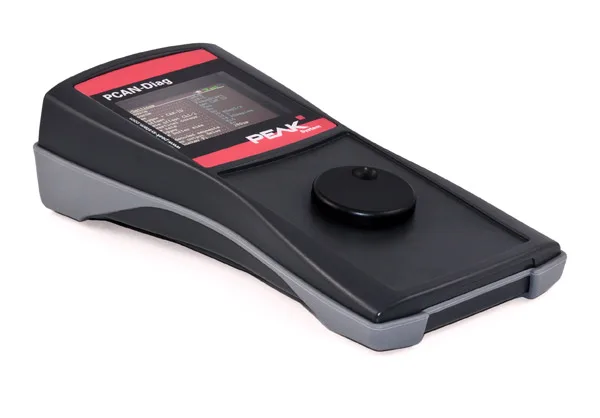
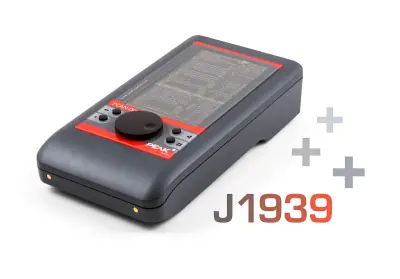
Outil de terrain pour contrôler un bus CAN haute vitesse : débit, charge, terminaison, signaux et tensions, avec enregistrement des trames et émission.
Aperçu du produit
Diagnostic et tracé du bus. Le PCAN-DIAG 2 de PEAK-System est un outil de diagnostic CAN portatif pour analyser un bus CAN haute vitesse (ISO 11898-2) conforme aux spécifications CAN 2.0 A/B, de la couche physique jusqu'au niveau protocolaire. Le débit se choisit dans une liste prédéfinie ou parmi 8 valeurs personnalisées, ou se détecte automatiquement à partir d'une liste de valeurs fixes, pour des débits CAN de 5 kbit/s à 1 Mbit/s. Le mode écoute seule permet d'observer le trafic sans émettre sur le bus, et la fonction de démarrage silencieux active ce mode lorsque le débit est erroné.
Mesure de charge et terminaison. La charge du bus s'affiche sous forme de diagramme temporel, avec affichage commutable des trames d'erreur, et ces diagrammes s'enregistrent en captures d'écran bitmap. La terminaison du bus haute vitesse se mesure même pendant le fonctionnement du système, et la terminaison CAN du bus raccordé s'active ou se coupe à volonté. La tension de chaque broche du connecteur D-Sub se mesure aussi.
Oscilloscope et déclenchement. Les deux voies indépendantes de l'oscilloscope, chacune avec un échantillonnage maximal de 20 MHz, affichent CAN-High, CAN-Low et leur différence. Le déclenchement peut se faire sur le début ou la fin de trame, sur les erreurs CAN ou sur une trame précise selon son identifiant CAN. Une sonde raccordée au connecteur BNC inspecte des signaux externes jusqu'à 1 MHz, et ce même connecteur peut déclencher des appareils de mesure externes. Les trames sont décodées à partir de la trace du signal enregistré.
Enregistrement, émission et projets. Les messages entrants s'enregistrent sur la carte mémoire interne avec filtrage par identifiant CAN, puis se relisent ou se convertissent vers différents formats avec le logiciel PEAK-Converter fourni. Les trames individuelles ou des listes de trames s'émettent, les données se saisissent en décimal, hexadécimal ou binaire, et un message d'émission se modifie pendant l'exécution. Les fichiers Symbol, créés avec le logiciel PCAN-Symbol Editor fourni, affichent les messages sous forme de symboles en tenant compte des énumérations, des multiplexeurs et des plages d'identifiants. La configuration, les listes d'émission, les fichiers Symbol et les données enregistrées se regroupent dans des projets, avec jusqu'à 8 débits par projet, transférables par liaison USB.
Alimentation et connexion. Le bus se raccorde par un connecteur D-Sub 9 broches conforme CiA 106, l'interface étant assurée par le transceiver NXP PCA82C251. L'appareil fonctionne sur 4 piles AA de 1,5 V ou sur le bloc d'alimentation fourni, branché sur la prise basse tension. L'écran de 320 x 240 pixels se pilote par une molette poussoir, et la carte mémoire interne de 2 GB sert aussi de support de stockage USB lorsque l'appareil est relié à un PC. La plage de température de fonctionnement va de 0 à 50 °C (32 à 122 °F).
Aucune question publiée sur cette référence pour l'instant. Les questions sont relues avant publication.
Spécifications complètes
Retrouvez toutes les caractéristiques enregistrées pour PCAN-DIAG 2, avec leur origine. Utilisez les filtres pour trouver rapidement l'information voulue.
Toutes les spécifications (40)
Caractéristique
Valeur
Caractéristique
High-speed CAN (ISO 11898-2) Complies with CAN specifications 2.0 A/B
Caractéristique
Selection of the bit rate from a preset list or from 8 user-defined values
Caractéristique
Automatic bit rate detection based on a fixed value list
Caractéristique
Switchable listen-only mode
Caractéristique
Switchable silent startup function (listen-only mode at wrong bit rate)
Caractéristique
Symbolic display of incoming CAN messages using Symbol files, taking into account enums (lists of values), multiplexers, and ID ranges
Caractéristique
Symbol files can be set up using the Windows® software PCAN-Symbol Editor supplied with this product
Caractéristique
Recording of incoming CAN messages to the internal memory card, if required, with CAN ID filtering
Caractéristique
Playback of trace files
Caractéristique
Conversion of trace data to various output formats using the Windows® software PEAK-Converter supplied with this product
Caractéristique
Transmitting individual CAN frames or CAN frame lists
Caractéristique
CAN bit rates from 5 kbit/s up to 1 Mbit/s
Caractéristique
Decimal, hexadecimal, or binary entering of CAN data. Data change of a single transmission message during runtime
Caractéristique
Measurement of CAN bus load, displayed by means of a time diagram, switchable display of error frames
Caractéristique
Bus load time diagrams can be saved as Bitmap screenshots
Caractéristique
Measurement of the termination of the High-speed CAN bus, even while the system is running
Caractéristique
Switchable CAN termination for the connected bus
Caractéristique
Voltage measurement for all pins of the CAN connector (D-Sub)
Caractéristique
Management of device configuration, transmit lists, Symbol files, and all recorded data (screenshots, trace, and CSV files) in projects
Caractéristique
Optional auto-reset on Bus Off
Caractéristique
Convenient configuration of all available device settings
Caractéristique
Compilation of transmit lists
Caractéristique
NXP PCA82C251 CAN transceiver
Caractéristique
Configuration of up to 8 bit rates per project
Caractéristique
Device configuration, transmit lists, and associated Symbol files can be saved in projects
Caractéristique
Projects can be transferred to the memory card of the PCAN-Diag 2 using a USB connection
Caractéristique
Oscilloscope with two independent measurement channels, each with a maximum sample rate of 20 MHz
Caractéristique
Display of the CAN-High and the CAN-Low signals as well as the difference of both signals
Caractéristique
Inspection of external signals (with frequencies up to 1 MHz) with a probe via the BNC connection
Caractéristique
Trigger configuration to frame start, frame end, CAN errors, or individual CAN frames based on their CAN ID
Caractéristique
External measurement devices can be triggered using the BNC connector
Caractéristique
Depiction of raw CAN frames
Caractéristique
Decoding of CAN frames from the recorded signal trace
Caractéristique
CAN bus connection via D-Sub, 9-pin (in accordance with CiA® 106)
Caractéristique
Display of various properties and of measuring data of the decoded CAN frame using the Report function
Caractéristique
Display with 320 x 240 pixel resolution
Caractéristique
Power supply via batteries (4 x 1.5 V AA) or using supply unit provided (low-voltage socket on unit)
Caractéristique
Internal memory card (2 GB) for saving projects. Can also be used as a USB mass storage device when connected to a PC
Caractéristique
Operating temperature range from 0 to 50 °C (32 to 122 °F)
Caractéristique
Analysis of CAN networks at the physical and the protocol level
Aucune spécification ne correspond.
Dernière vérification : 2026-11-25
Documentation technique
Les documents officiels et les données techniques enregistrées pour PCAN-DIAG 2. Pour un document manquant ou une version précise, nos experts vous le transmettent.
1. Vue d'ensemble technique
Outil de terrain pour contrôler un bus CAN haute vitesse : débit, charge, terminaison, signaux et tensions, avec enregistrement des trames et émission.
2. Fiche technique (valeurs enregistrées)
Paramètre
Valeur
Caractéristique
High-speed CAN (ISO 11898-2) Complies with CAN specifications 2.0 A/B
Caractéristique
Selection of the bit rate from a preset list or from 8 user-defined values
Caractéristique
Automatic bit rate detection based on a fixed value list
Caractéristique
Switchable listen-only mode
Caractéristique
Switchable silent startup function (listen-only mode at wrong bit rate)
Caractéristique
Symbolic display of incoming CAN messages using Symbol files, taking into account enums (lists of values), multiplexers, and ID ranges
Caractéristique
Symbol files can be set up using the Windows® software PCAN-Symbol Editor supplied with this product
Caractéristique
Recording of incoming CAN messages to the internal memory card, if required, with CAN ID filtering
Caractéristique
Playback of trace files
Caractéristique
Conversion of trace data to various output formats using the Windows® software PEAK-Converter supplied with this product
Caractéristique
Transmitting individual CAN frames or CAN frame lists
Caractéristique
CAN bit rates from 5 kbit/s up to 1 Mbit/s
Caractéristique
Decimal, hexadecimal, or binary entering of CAN data. Data change of a single transmission message during runtime
Caractéristique
Measurement of CAN bus load, displayed by means of a time diagram, switchable display of error frames
Caractéristique
Bus load time diagrams can be saved as Bitmap screenshots
Caractéristique
Measurement of the termination of the High-speed CAN bus, even while the system is running
Caractéristique
Switchable CAN termination for the connected bus
Caractéristique
Voltage measurement for all pins of the CAN connector (D-Sub)
Caractéristique
Management of device configuration, transmit lists, Symbol files, and all recorded data (screenshots, trace, and CSV files) in projects
Caractéristique
Optional auto-reset on Bus Off
Caractéristique
Convenient configuration of all available device settings
Caractéristique
Compilation of transmit lists
Caractéristique
NXP PCA82C251 CAN transceiver
Caractéristique
Configuration of up to 8 bit rates per project
Caractéristique
Device configuration, transmit lists, and associated Symbol files can be saved in projects
Caractéristique
Projects can be transferred to the memory card of the PCAN-Diag 2 using a USB connection
Caractéristique
Oscilloscope with two independent measurement channels, each with a maximum sample rate of 20 MHz
Caractéristique
Display of the CAN-High and the CAN-Low signals as well as the difference of both signals
Caractéristique
Inspection of external signals (with frequencies up to 1 MHz) with a probe via the BNC connection
Caractéristique
Trigger configuration to frame start, frame end, CAN errors, or individual CAN frames based on their CAN ID
Caractéristique
External measurement devices can be triggered using the BNC connector
Caractéristique
Depiction of raw CAN frames
Caractéristique
Decoding of CAN frames from the recorded signal trace
Caractéristique
CAN bus connection via D-Sub, 9-pin (in accordance with CiA® 106)
Caractéristique
Display of various properties and of measuring data of the decoded CAN frame using the Report function
Caractéristique
Display with 320 x 240 pixel resolution
Caractéristique
Power supply via batteries (4 x 1.5 V AA) or using supply unit provided (low-voltage socket on unit)
Caractéristique
Internal memory card (2 GB) for saving projects. Can also be used as a USB mass storage device when connected to a PC
Caractéristique
Operating temperature range from 0 to 50 °C (32 to 122 °F)
Caractéristique
Analysis of CAN networks at the physical and the protocol level
FAQ technique
Les réponses aux questions que les caractéristiques enregistrées de PCAN-DIAG 2 permettent de traiter. Une question n'est pas posée quand rien n'est enregistré pour y répondre.
1Prend-il en charge le bus CAN ?
Oui — enregistré sous « Caractéristique » : High-speed CAN (ISO 11898-2) Complies with CAN specifications 2.0 A/B.
2Dispose-t-il d’une interface USB ?
Oui — enregistré sous « Caractéristique » : Projects can be transferred to the memory card of the PCAN-Diag 2 using a USB connection.
Des références proches pour répondre à votre besoin. Comparez les principales caractéristiques. Un remplacement enregistré est une relation documentée ; un produit similaire n'est qu'une similarité, jamais une garantie de compatibilité.
Produit actuelPEAK-System
PCAN-DIAG 2
Outil de diagnostic CAN portatif avec oscilloscope
Caractéristique
High-speed CAN (ISO 11898-2) Complies with CAN specifications 2.0 A/B
Caractéristique
Selection of the bit rate from a preset list or from 8 user-defined values
Caractéristique
Automatic bit rate detection based on a fixed value list
Ce qui est enregistré sur le statut réglementaire et la vie de cette référence.
Conformité réglementaire
Aucune déclaration de conformité n'est enregistrée pour cette référence. Demandez au fournisseur les déclarations RoHS et REACH et, pour un produit radio, la déclaration UE de conformité.
Avec votre accord, nous utilisons des cookies Google pour mesurer l’audience du site et de nos publicités. Votre panier devis et votre comparaison restent dans votre navigateur dans tous les cas. Détails