Product Overview
Computing System
ARM-based System
AIB-IMX8M
BACK
Comparison
E-Catalog
Inquiry
Comparison
Datasheet
AVAILABLE
AIB-IMX8M
Compact Fanless NXP Box PC
Comparison
Datasheet
Comparison
Datasheet
NXP® i.MX8M Quad ARM Cortex A53 Quad Core Up to 1.5GHz; Cortex-M4 core processor
Fanless Compact Box PC
Dual GLAN
M.2 Key E Socket (For WIFI/BT)
M.2 Key B Socket + SIM Socket (For LTE)
DC IN 12~24V
OS Support Linux Yocto (first) & Android & Ubuntu
-40°C ~ 60°C
CE, FCC Class B
Specification
Document
FAQ
Product Specification
System Information
Processor
NXP i.MX8M Cortex-A53 Quad Core 1.3GHz; Cortex-M4 core processor
System Memory
2GB DDR4 (default)/ (expandable to the Max 4GB )
Storage
eMMC
16GB eMMC / (expandable to 64GB Max)
External I/O Connector
External I/O Connector
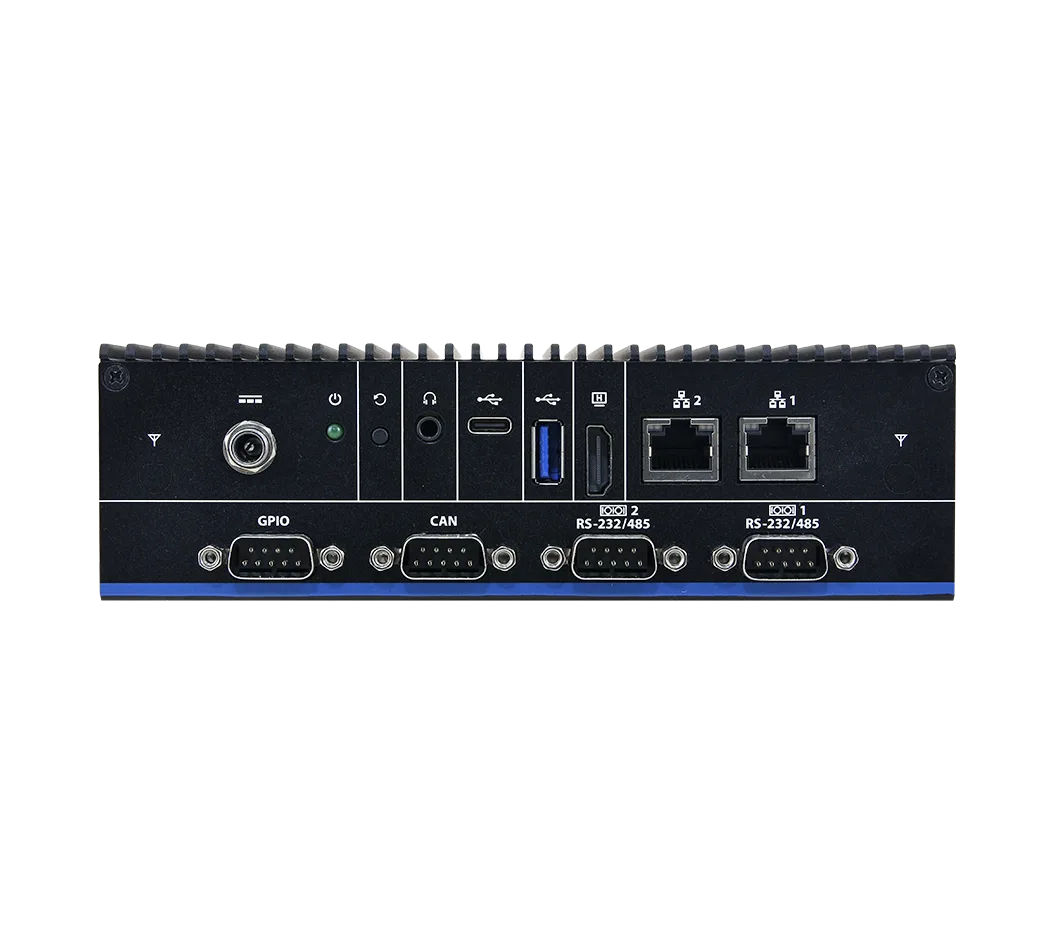
2 x Gigabit LAN
1 x DC Jack (J6)
1 x Headphone Jack.
1 x HDMI 2.0 In connector (Vertical type)
1 x Power LED
1 x Reset
1 x USB 3.0 Type A
1 x USB 3.0 Type C (Data only)
1 x GPIO 8 pin (DB9)
1 x CAN (DB9)
2x RS232/485 (DB9)
Display
Multiple Display
HDMI / LVDS / MIPI DSI
Power Requirement
DC Input Voltage
DC IN 12~24V (Note: LVDS and MIPI only support 12V input)
Software Support
Linux Yocto (Default), Android, Ubuntu
Certification
Certification Information
FCC Class B
Mechanical & Environmental
Operating Temp.
-40°C ~ 60°C
Storage Temp.
-20°C ~ 85°C
Operating Humidity
0% ~ 90% Relative Humidity, Non-condensing
Dimension (W x L x H)
170mm*110mm*50mm
Internal I/O Connector
Internal I/O Connector
1 x Backlight
1 x Front Panel
1 x LVDS
1 x M.2 2230 E-Key (WiFi/BT)
1 x M.2 3042 B-Key (3G/4G Module)
2 x MIPI CSI
1 x SIM Socket (For Use LTE M.2 Card)
1 x RTC battery
1 x Mic-In
1 x 2x10 P Header (USB3.0)
1 x Header Extend connector(J22)
Ordering Information
Ordering Information
AIB-IMX8M-A1-2R
Manual
Select Operating System
All
Manual
Total 2 Files
No.
Release Date
Title、Version
Operating System
Document
Download
2026-10-15
AIB-IMX8M 1st Quick Reference Guide
2026-07-02
RSC-IMX8M 7th manual
Related FAQ
Update Date
Category
Title
More
2025-10-14
Software Application
To use RU and RW tool check RTC function
2025-10-14
Software OS
How addition SNMP in Windows 10
2025-10-14
Software BIOS
Update BIOS on Windows OS
2025-10-14
Software Driver
How to make Avalue Board support Wake On LAN (WOL) Function
2025-10-14
General Power
How to use “Power ON after power failure function” to boot system without press Power button.
Added to compare.
Check now!