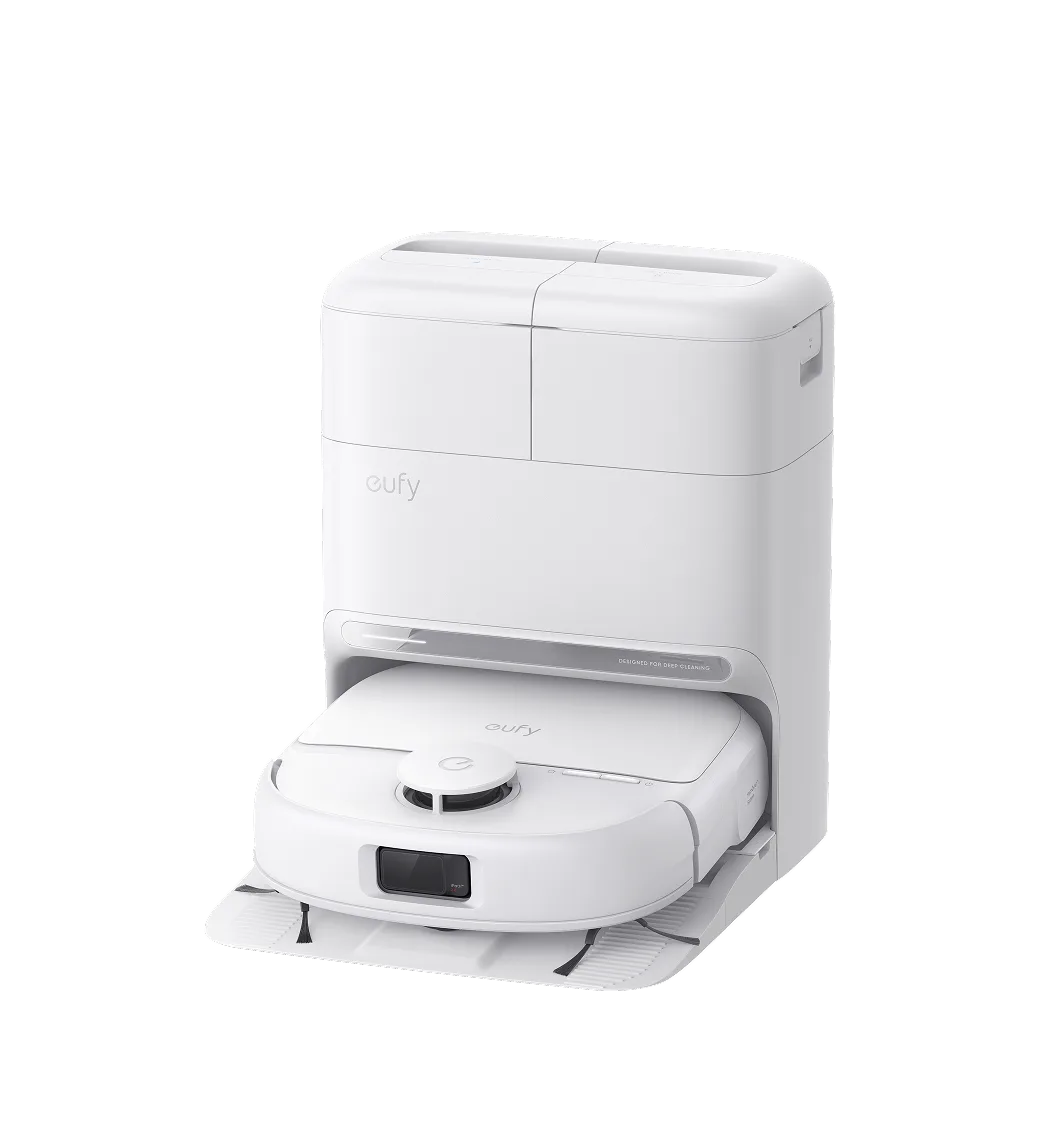
eufy Robot Vacuum Omni C28 White
Select
Overview
Detail
Compare
Select
Overview
Detail
Compare
Products Key Features
Specs
Your Benefits
Installment
as Plus Member
Plus Member
Other Benefits
Flexible installment payment options available.
Highlights View Details
HydroJet™ Self-Cleaning Roller Mop
DuoSpiral™ Detangle Brush
15,000 Pa Powerful Suction
5‑in‑1 Omni Station
iPath™ 2.0 Smart Navigation
Choice
eufy Robot Vacuum Omni C28
eufy Robot Vacuum Omni C28 White + Replacement Kit + Cleaning Solution ×2
eufy Robot Vacuum Omni C28 + Replacement Kit + Cleaning Solution *2
eufy Robot Vacuum Omni C28 + Free Replacement Kit for C28
Frequently Bought Together What is
Basic Quarterly Accessory Subscription Bundle for eufy Omni C28
Recommend
Basic Half-Year Accessory Subscription Bundle for eufy Omni C28
Pet Owner Accessory Subscription Bundle for eufy Omni C28
eufy Robot Vacuum Omni C28 White is Ready
Add it to Your Cart Now.
eufy Robot Vacuum Omni C28 White
Overview
View More
View More
HydroJet™ Self-Cleaning Roller Mop
DuoSpiral™ Detangle Brush
15,000 Pa Powerful Suction
5‑in‑1 Omni Station
HydroJet™ Self-Cleaning Roller Mop
DuoSpiral™ Detangle Brush
15,000 Pa Powerful Suction
5‑in‑1 Omni Station
The Standout in the Lineup
Real-Time Self-Cleaning Mop
Mops Clean Every Time
The mop stays fresh for more effective mess removal.
others
eufy C28
Ultimate Floor Mopping, Revolutionary Cleaning
HydroJet™ Self-Cleaning Roller Mop
Say Goodbye to Tangles
No more pulling, cutting, or scraping hair out of the brush.
0% Hair Tangling
Cleans up hair while keeping the roller brush tangle-free, so you never have to stop and clean the brush yourself.
All-in-One Station for a Clean and Healthy Home
1. Self-Cleaning Mop
2. Auto Hot-Air Drying
3. Auto Dust Emptying
4. Auto Tank Refilling
5. Auto Wastewater Collection
A Truly Hygienic Clean, From Mop to Floor
Self-Cleaning Mop Cleans the Mop After Every Session
Hot Air Self-Drying Intelligent 95-122°F Drying
Auto Tank Refilling 2.2L clean water tank
Auto Wastewater Collection 8L Dirty Water Tank
75 Days, Zero Maintenance
Dust and debris is automatically sealed in a 3L bag, ensuring hands-free cleaning for up to 75 days.
Comprehensive App Control
Dimensions
What’s in the Box
FAQ
What should I do before using Omni C28 to ensure the best cleaning performance?
Suction&Empty Frequency: If you have pets or children at home, it is recommended to use Turbo or Max suction mode and adjust the empty frequency to 15 min or 30 min via the eufy Clean app for a better cleaning performance.
Dirty Spot Cleaning: Enable the "Dirty Spot Cleaning" feature, the robot will detect stains like coffee spills and perform deep precision mopping. (Note: In vacuum-only mode, it will automatically switch to vacuum and mopping mode upon detecting dirt.)
Dirt Inspection: Enable the Dirt Inspection feature, the robot will auto-inspect the room after completing a full house cleaning to ensure no stains are left behind.
Accessories Maintenance: For optimal performance, robot accessories(especially the roller) need to be cleaned and replaced regularly.
Keep Software Updated: Regularly update the software and firmware to the latest version to ensure optimal performance and access to new features.
How do I enhance Omni C28's mopping performance?
First Use: When using it for the first time, Omni C28 may leave mopping streaks from thick dust under furniture. This is normal and will improve with continued use.
Dust Removal Before Mopping: Use the eufy app’s Vacuum-Only mode 2–3 times before mopping to clear dust and hair.
Water Level & Stubborn Stains: Increase the water level in the app for better mopping. For stubborn stains, pre-wet the area manually, then select the area and mop 2–3 times.
Cleaning Solution: If a cleaning solution is needed, scan the QR code on the station to purchase the official eufy cleaning solution. Mix it with water at a 1:200 ratio for optimal performance.
Firmware Updates: Ensure optimal performance by updating to the latest firmware whenever you receive a notification.
How can I use the robot on multiple floors?
Vacuum-Only: Place the robot on any floor and start vacuuming.
Vacuum-and-Mop: Start at the Omni Station to wet the roller mop, then move the robot to the target floor for cleaning. For detailed guidance, please refer to the multi-floor user guide video on our official website.
Note: On a floor without an Omni Station, you must manually return the robot for mop washing and low-battery charging. “Return to base station failed” or “Positioning failed” alerts during multi-floor cleaning are normal. For more convenient multi-floor use, an additional Omni Station can be purchased from eufy.
Where can I find the manual?
Manual Availability: A printed manual is not provided, but an electronic version is available.
Via QR Code: Scan the QR code on the included Quick Start Guide or on the device’s bottom label to access the manual.
Via Amazon Listing: You can also download the manual from the “Safety and Product Resources” section on this Amazon listing.
Download User Guide
Manual User Guide
2024-11-18
Why Select eufy Store
Payment Method
Rich and secure payment methods, fast and secure materials
Delivery Method
Fast and secure delivery
Service and Benefits
Fast and secure delivery