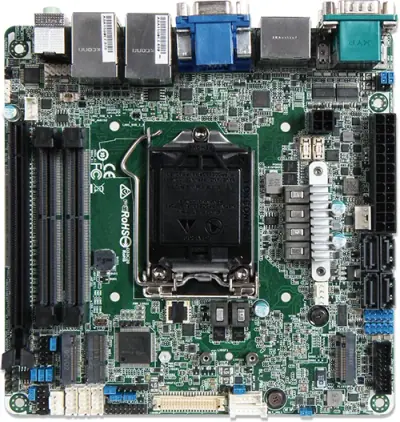
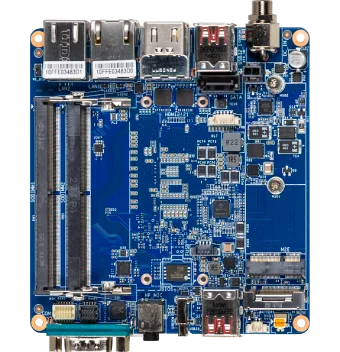
QBI-6412A
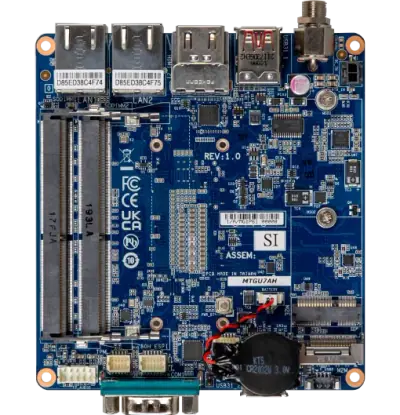
Embedded Mini-ITX motherboard with Intel Celeron J6412 processor
- Storage
- 1 x SATA 6Gb/s Port
- Ethernet
- 2 x GbE LAN Ports (Intel® I210AT)
- Form factor
- Embedded Compact Board 105W x 110D (mm)
- Audio
- Realtek® Audio Codec
Embedded Mini-ITX motherboard with Intel Celeron J6412 processor
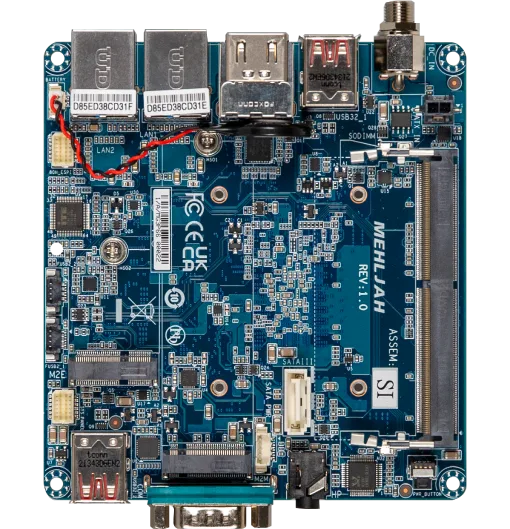
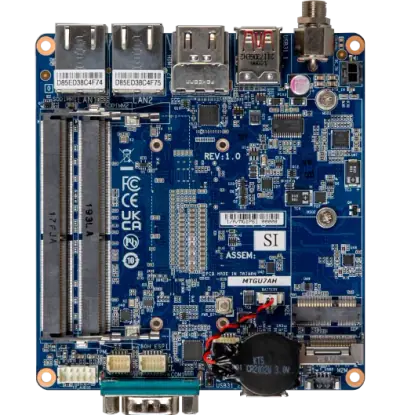
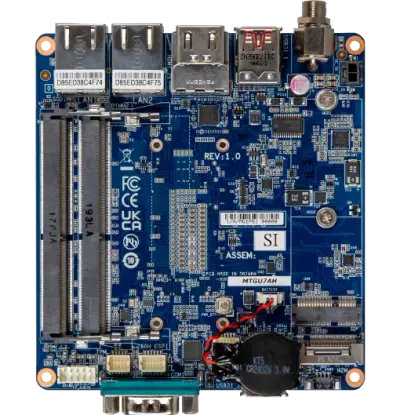
The GigaIPC QBi-6412A is a compact embedded motherboard measuring 105 x 110 mm, featuring an Intel Celeron J6412 processor and two GbE ports, intended for embedded industrial applications.
Overview. The GigaIPC QBi-6412A is an embedded compact board in a 105 x 110 mm form factor, designed for compact industrial systems.
Main characteristics. It integrates an Intel Celeron J6412 processor built on 10 nm, with 4 cores and 4 threads, up to 2.60 GHz and a TDP of 10 W. Memory is provided by one DDR4 SO-DIMM socket, maximum capacity 32 GB, supporting single channel DDR4 3200 MHz modules.
Interfaces and connectivity. The board provides two Intel I210AT GbE LAN ports and two RJ45 LAN ports at the rear, two HDMI 2.0 outputs supporting a maximum resolution of 4096 x 2160 at 60 Hz on two independent displays, and one SATA 6Gb/s port. Expansion slots include one 2280 M.2 M-Key (PCIe x2, SATA 6Gb/s) and one 2230 M.2 E-Key. The front panel offers two USB 3.2 Gen 2x1 ports, one COM port (RS-232), a combo audio jack and a power button. Audio is handled by a Realtek codec.
Power and environment. Power is supplied through a screw-type DC jack of +12 V to +19 VDC. The operating temperature ranges from 0 °C to 60 °C, with humidity from 0 to 90 % non-condensing.
Typical uses and integration. The RS-232 port and network ports allow connection of control and communication devices. The board is compatible with Windows 10 (x64), and its BIOS offers power management and security options, including Secure Boot and IPv4 and IPv6 PXE boot.
No published question about this part yet. Questions are reviewed before publication.
Every characteristic recorded for QBI-6412A, with where it comes from. Use the filters to find one quickly.
| Characteristic | Value |
|---|---|
| Form factor | Embedded Compact Board 105W x 110D (mm) |
| Administrator Password | To set up Administrator's password Minimum length : 3 Maximum length : 20 |
| Audio | Realtek® Audio Codec |
| BIOS Lock | Enable/Disable BIOS Lock function Enabled : Enables BIOS Lock function (Default setting) Disabled : Disabled BIOS Lock funtion |
| BIOS Version | Shows the BIOS version of the system |
| Boot Option #1 Boot Option #2 | Shows the information of the storage that be installed in the system Choose/set the boot priority |
| Build Date and Time | Shows the Build Date and Time when the BIOS was created. |
| C 68 | NC |
| Chipset | — |
| ck 52 st | Reset |
| ck n 48 | NC |
| Connector PN | Vendor |
| CPU | Intel® Celeron® J6412 Processor 10nm, 4 cores, 4 threads, up to 2.60 GHz TDP 10W |
| CPU C states | Command CPU to enter into low power consumption mode when CPU is under idle mode. Enabled : Enables CPU C states function (Default setting) Disabled : Disables CPU C states function |
| CPU Fan Fail Warning | Enabled : Enables CPU FAN Fail warning alert function (Default setting) Disabled : Disables CPU FAN Fail warning alert function |
| CPU Fan Speed | Shows current CPU fan Speed |
| CPU Fan Speed Control | Normal : Fan speed set by BIOS default (Default setting) Full Speed : Set Fan operates at full speed |
| CPU P states | CPU will adjust frequency depends on it's loading. Enabled : Enables CPU P states function (Default setting) Disabled : Disables CPU P states function |
| CPU Temperature | Shows current CPU temperature |
| D 40 | NC |
| D 46 | NC |
| D 52 | PCIE Clock Request |
| D 58 | NC |
| D 72 | 3.3V |
| D 74 | 3.3V |
| Discard Changes and Reset | Choose this option to reboot the system without saving any changes Yes : Agree to discard changes and reset No : Cancel to discard changes and reset |
| DVMT Pre Allocated | Use DVMT Pre-Allocated to set the amount of system memory which is installed to the integrated graphics processor Option items : 32M , 64M(Default setting), 128M, 256M |
| ect 70 | 3.3V |
| EIST | According to System loading, Enhanced Intel SpeedStep Technology (EIST)will automatically adjust the CPU voltage and core frequency to decrease heat and power consumption for power saving. Enabled : Enables EIST Technology (Default setting) Disabled : Disables EIST Technology |
| Enroll Efi Image | Allow the image to run in Secure Boot mode |
| Enter | Execute command or enter the submenu |
| ESC | Exit the BIOS Setup program |
| Ethernet | 2 x GbE LAN Ports (Intel® I210AT) |
| eup 54 | BT_Disable |
| Expansion Slots | 1 x 2280 M.2 M-Key (PCIe x2, SATA 6Gb/s) 1 x 2230 M.2 E-Key |
| Export Secure Boot variables | Copy NVRAM content of Secure Boot variables to files in a root folder on a file system device |
| F1 | General Help |
| F2 | Previous Values |
| F3 | Load Optimized Defaults Settings |
| F4 | Save changes & Exit the BIOS Setup program |
| Factory Key Provision | Install factory default Secure Boot keys after the platform reset and while the system is in Setup mode Enabled : Enables Factory Key Provision (Default setting) Disabled : Disables Factory Key Provision |
| Front IO | 2 x USB 3.2 Gen 2x1 1 x COM Port (RS-232) 1 x Combo Audio Jack (Headphone & Headset) 1 x Power button |
| Full Screen LOGO Show | Enable/Disable full screen LOGO show on POST screen Enabled : Enables Full screen LOGO Show on POST screen Disabled : Disables Full screen LOGO Show on POST screen (Default setting) |
| HD Audio | Enable/Disable onboard audio controller Enabled : Enables onboard audio controller (Default setting) Disabled : Disables onboard audio controller |
| Intel Virtualization Technology | Virtualization enhanced by Intel® Virtualization Technology will allow a platform to run multiple operating systems and applications in independent partitions. With virtualization, one computer system can function as multiple virtual systems. Enabled : Enables Intel Virtualization Technology (Default setting) Disabled : Disables Intel Virtualization Technology |
| Internal I/O | 1 x 2-pin power connector 1 x SATA power header 1 x CPU fan header 1 x Front panel header 2 x USB 2.0 headers |
| IPv4 PXE Support | When Network stack is enabled : Disabled : Disables Ipv4 PXE Support Enabled : Enables Ipv4 PXE Support |
| IPv6 PXE Support | When Network stack is enabled : Disabled : Disables Ipv6 PXE Support Enabled : Enables Ipv6 PXE Support |
| ition Pin No. | Definition |
| Key Management | Enables expert users to modify Secure boot policy variables without full authentication Press <Enter> to configure the advanced items |
| LAN1 MAC Address | Shows LAN1 MAC Address information |
| LAN2 MAC Address | Shows LAN2 MAC Address information |
| M.2 Port | shows M.2 SATA interface SSD information |
| Me FW Image Re-Flash | Enable/Disable Me FW image re-flash function Enabled : Enables Me FW image re-flash function Disabled : Disables Me FW image re-flash function (Default setting) |
| ME FW version | Shows ME firmware version |
| Memory | 1 x DDR4 SO-DIMM sockets, Max. Capacity 32 GB Support Single Channel DDR4 3200 MHz memory modules |
| Motherboard | QBi-6412A (MEHLJAH) |
| n 42 | NC |
| Network Stack | When system is power on, install LAN driver under UEFI mode Disabled : Disables UEFI Network Stack (Default setting) Enabled : Enables UEFI Network Stack |
| ock n 54 | NC |
| ock p 56 | NC |
| Onboard LAN1 Onboard LAN2 | Enable/Disable onboard LAN controller Enabled : Enables onboard LAN controller (Default setting) Disabled : Disables onboard LAN controller |
| Operating Properties | Operating temperature: 0°C to 60°C Operating humidity: 0-90% (non-condensing) Non-operating temperature: -40°C to 85°C Non-operating humidity: 0%-95% (non-condensing) |
| Order Information | Motherboard : 9MEHLJAHMR-SI (Box Packing) |
| OS Compatibility | Windows 10 (x64) |
| Output select | Choose default monitor output when there are more than one monitor plugged on the motherboard. |
| p 40 | NC |
| Packaging Content | Carton size: 465 x 351 x 217 (mm) Packing Capacity: 10pcs Single Box size: 221 x 178 x 65 (mm) Including: SATA Power cable 150mm x 1 (25CRI-150621-K1R) |
| Packing Content | Carton size: 465 x 351 x 217 (mm) Packing Capacity: 10pcs Single Box size: 221 x 178 x 65 (mm) Including: SATA power cable 150mm x 1 (P/N: 25CRI-150621-K1R) |
| Part No. Descrip | tion |
| Pending operation | None : No execution will be conducted (Default setting) TPM clear : Set to clear data on TPM |
| PIN No. | Definition |
| Platform Key (PK) | These items allows you to enroll factory defaults or load Certificates from a file. |
| Project name | Shows Project name information |
| QBi-6412A (MEHLJAH) | 1 |
| RAID | — |
| Rear IO | 2 x RJ45 LAN Ports 2 x HDMI 2 x USB 3.2 Gen 2x1 1 x Screw type DC Jack (+12V~19VDC) |
| Remove 'UEFI CA' from DB | To remove 'UEFI CA' from database |
| Reset To Setup Mode | Yes : Agree to setup mode No : Cancel to setup mode |
| Restore AC Power Loss | To set which option the system should returns if a sudden power loss occured Power off : Do not power on when the power is back (Default setting) Power on : System power on when the power is back Last state : Restore the system to the state before power loss occures |
| Restore DB defaults | Restore DB variables to factory defaults Yes : Agree to restore DB defaults No : Cancel to restore DB defaults |
| Restore defaults | Restore/Load default values for all the setup options Yes : Agree to load optimized defaults No : Cancel to load optimized defaults |
| Restore Factory Keys | To restore factory settings Yes : Agree to restore factory settings No : Cancel to restore factory settings |
| RXn/ 42 RXp | NC |
| RXp/ 44 RXn | NC |
| SATA Mode Selection | AHCI : Configures the SATA controllers to AHCI mode. (Default setting) |
| SATA power cable | 1 |
| Save Changes and Reset | After configuring all the options that you wish to change, choose this option to save all the changes and reboot the system Yes : Agree to save and reset No : Cancel to save and reset |
| Secure Boot | Press <Enter> to configure the advanced items |
| Secure Boot Mode | Standard : Standard mode Custom : Custom mode (Default setting) |
| Security Device Support | Enabled : Enables TPM feature (Default setting) Disabled : Disables TPM feature |
| Serial ATA Port 0 | shows 2.5" SATA HDD/SSD information |
| Serial Port 1 Configuration | Press [Enter] to configure advanced items : Enable or Disable Serial Port Enabled : Enables Serial Port function (Default setting) Disabled : Disables Serial Port function Device settings : Display the specified Serial Port base I/O address and IRQ |
| Side IO | — |
| Socket | 1 x FCBGA1493 |
| Storage | 1 x SATA 6Gb/s Port |
| Super IO Chip | Shows Super I/O chip model |
| System Date | Set the Date for the system (Format : Week - Month - Day - Year) |
| System Temperature | Shows current system temperature |
| System Time | Set the time for the system (Format : Hour - Minute - Second) |
| Total Memory | Shows the total memory size of the installed memory |
| TPM | — |
| TPM Device Selection | PTT : Internal TPM (Default setting) |
| Turbo Mode | Enabled : Enables Turbo Mode (Default setting) Disabled : Disables Turbo Mode |
| TXn/ 48 TXn | NC |
| TXp/ 50 TXp | PCI Reset |
| User Password | To set up User's password Minimum length : 3 Maximum length : 20 |
| Video | Integrated Graphics Processor - Intel® UHD Graphics for 10th Gen Intel® Processors : 2 x HDMI 2.0 port, supporting a maximum resolution of 4096x2160 @60Hz (2 independent display outputs) |
| VT-d | Enabled : Enables VT-d function (Default setting) Disabled : Disables VT-d function |
| Wake system from S5 | Enable or Disable System to wake on a specific time. Disabled : Disables system to wake on a specific time (Default setting) Fixed Time : Enables system to wake on a specific time (Format : hr : min : sec) |
| Watchdog Timer Value | Enable/Disable Watchdog Timer function Enabled : Enables Watchdog Timer function Disabled : Disabled Watchdog Timer function (Default setting) |
| XHCI Hand-off | Enable/Disable XHCI Hand-off function Enabled : Enables XHCI Hand-off function (Default setting) Disabled : Disables XHCI Hand-off function |
No specification matches.
Last verification : 2026-11-03
Official documents and the technical data recorded for QBI-6412A. For a missing document or a specific revision, our experts send it to you.
The GigaIPC QBi-6412A is a compact embedded motherboard measuring 105 x 110 mm, featuring an Intel Celeron J6412 processor and two GbE ports, intended for embedded industrial applications.
| Parameter | Value |
|---|---|
| Form factor | Embedded Compact Board 105W x 110D (mm) |
| Administrator Password | To set up Administrator's password Minimum length : 3 Maximum length : 20 |
| Audio | Realtek® Audio Codec |
| BIOS Lock | Enable/Disable BIOS Lock function Enabled : Enables BIOS Lock function (Default setting) Disabled : Disabled BIOS Lock funtion |
| BIOS Version | Shows the BIOS version of the system |
| Boot Option #1 Boot Option #2 | Shows the information of the storage that be installed in the system Choose/set the boot priority |
| Build Date and Time | Shows the Build Date and Time when the BIOS was created. |
| C 68 | NC |
| Chipset | — |
| ck 52 st | Reset |
| ck n 48 | NC |
| Connector PN | Vendor |
| CPU | Intel® Celeron® J6412 Processor 10nm, 4 cores, 4 threads, up to 2.60 GHz TDP 10W |
| CPU C states | Command CPU to enter into low power consumption mode when CPU is under idle mode. Enabled : Enables CPU C states function (Default setting) Disabled : Disables CPU C states function |
| CPU Fan Fail Warning | Enabled : Enables CPU FAN Fail warning alert function (Default setting) Disabled : Disables CPU FAN Fail warning alert function |
| CPU Fan Speed | Shows current CPU fan Speed |
| CPU Fan Speed Control | Normal : Fan speed set by BIOS default (Default setting) Full Speed : Set Fan operates at full speed |
| CPU P states | CPU will adjust frequency depends on it's loading. Enabled : Enables CPU P states function (Default setting) Disabled : Disables CPU P states function |
| CPU Temperature | Shows current CPU temperature |
| D 40 | NC |
| D 46 | NC |
| D 52 | PCIE Clock Request |
| D 58 | NC |
| D 72 | 3.3V |
| D 74 | 3.3V |
| Discard Changes and Reset | Choose this option to reboot the system without saving any changes Yes : Agree to discard changes and reset No : Cancel to discard changes and reset |
| DVMT Pre Allocated | Use DVMT Pre-Allocated to set the amount of system memory which is installed to the integrated graphics processor Option items : 32M , 64M(Default setting), 128M, 256M |
| ect 70 | 3.3V |
| EIST | According to System loading, Enhanced Intel SpeedStep Technology (EIST)will automatically adjust the CPU voltage and core frequency to decrease heat and power consumption for power saving. Enabled : Enables EIST Technology (Default setting) Disabled : Disables EIST Technology |
| Enroll Efi Image | Allow the image to run in Secure Boot mode |
| Enter | Execute command or enter the submenu |
| ESC | Exit the BIOS Setup program |
| Ethernet | 2 x GbE LAN Ports (Intel® I210AT) |
| eup 54 | BT_Disable |
| Expansion Slots | 1 x 2280 M.2 M-Key (PCIe x2, SATA 6Gb/s) 1 x 2230 M.2 E-Key |
| Export Secure Boot variables | Copy NVRAM content of Secure Boot variables to files in a root folder on a file system device |
| F1 | General Help |
| F2 | Previous Values |
| F3 | Load Optimized Defaults Settings |
| F4 | Save changes & Exit the BIOS Setup program |
| Factory Key Provision | Install factory default Secure Boot keys after the platform reset and while the system is in Setup mode Enabled : Enables Factory Key Provision (Default setting) Disabled : Disables Factory Key Provision |
| Front IO | 2 x USB 3.2 Gen 2x1 1 x COM Port (RS-232) 1 x Combo Audio Jack (Headphone & Headset) 1 x Power button |
| Full Screen LOGO Show | Enable/Disable full screen LOGO show on POST screen Enabled : Enables Full screen LOGO Show on POST screen Disabled : Disables Full screen LOGO Show on POST screen (Default setting) |
| HD Audio | Enable/Disable onboard audio controller Enabled : Enables onboard audio controller (Default setting) Disabled : Disables onboard audio controller |
| Intel Virtualization Technology | Virtualization enhanced by Intel® Virtualization Technology will allow a platform to run multiple operating systems and applications in independent partitions. With virtualization, one computer system can function as multiple virtual systems. Enabled : Enables Intel Virtualization Technology (Default setting) Disabled : Disables Intel Virtualization Technology |
| Internal I/O | 1 x 2-pin power connector 1 x SATA power header 1 x CPU fan header 1 x Front panel header 2 x USB 2.0 headers |
| IPv4 PXE Support | When Network stack is enabled : Disabled : Disables Ipv4 PXE Support Enabled : Enables Ipv4 PXE Support |
| IPv6 PXE Support | When Network stack is enabled : Disabled : Disables Ipv6 PXE Support Enabled : Enables Ipv6 PXE Support |
| ition Pin No. | Definition |
| Key Management | Enables expert users to modify Secure boot policy variables without full authentication Press <Enter> to configure the advanced items |
| LAN1 MAC Address | Shows LAN1 MAC Address information |
| LAN2 MAC Address | Shows LAN2 MAC Address information |
| M.2 Port | shows M.2 SATA interface SSD information |
| Me FW Image Re-Flash | Enable/Disable Me FW image re-flash function Enabled : Enables Me FW image re-flash function Disabled : Disables Me FW image re-flash function (Default setting) |
| ME FW version | Shows ME firmware version |
| Memory | 1 x DDR4 SO-DIMM sockets, Max. Capacity 32 GB Support Single Channel DDR4 3200 MHz memory modules |
| Motherboard | QBi-6412A (MEHLJAH) |
| n 42 | NC |
| Network Stack | When system is power on, install LAN driver under UEFI mode Disabled : Disables UEFI Network Stack (Default setting) Enabled : Enables UEFI Network Stack |
| ock n 54 | NC |
| ock p 56 | NC |
| Onboard LAN1 Onboard LAN2 | Enable/Disable onboard LAN controller Enabled : Enables onboard LAN controller (Default setting) Disabled : Disables onboard LAN controller |
| Operating Properties | Operating temperature: 0°C to 60°C Operating humidity: 0-90% (non-condensing) Non-operating temperature: -40°C to 85°C Non-operating humidity: 0%-95% (non-condensing) |
| Order Information | Motherboard : 9MEHLJAHMR-SI (Box Packing) |
| OS Compatibility | Windows 10 (x64) |
| Output select | Choose default monitor output when there are more than one monitor plugged on the motherboard. |
| p 40 | NC |
| Packaging Content | Carton size: 465 x 351 x 217 (mm) Packing Capacity: 10pcs Single Box size: 221 x 178 x 65 (mm) Including: SATA Power cable 150mm x 1 (25CRI-150621-K1R) |
| Packing Content | Carton size: 465 x 351 x 217 (mm) Packing Capacity: 10pcs Single Box size: 221 x 178 x 65 (mm) Including: SATA power cable 150mm x 1 (P/N: 25CRI-150621-K1R) |
| Part No. Descrip | tion |
| Pending operation | None : No execution will be conducted (Default setting) TPM clear : Set to clear data on TPM |
| PIN No. | Definition |
| Platform Key (PK) | These items allows you to enroll factory defaults or load Certificates from a file. |
| Project name | Shows Project name information |
| QBi-6412A (MEHLJAH) | 1 |
| RAID | — |
| Rear IO | 2 x RJ45 LAN Ports 2 x HDMI 2 x USB 3.2 Gen 2x1 1 x Screw type DC Jack (+12V~19VDC) |
| Remove 'UEFI CA' from DB | To remove 'UEFI CA' from database |
| Reset To Setup Mode | Yes : Agree to setup mode No : Cancel to setup mode |
| Restore AC Power Loss | To set which option the system should returns if a sudden power loss occured Power off : Do not power on when the power is back (Default setting) Power on : System power on when the power is back Last state : Restore the system to the state before power loss occures |
| Restore DB defaults | Restore DB variables to factory defaults Yes : Agree to restore DB defaults No : Cancel to restore DB defaults |
| Restore defaults | Restore/Load default values for all the setup options Yes : Agree to load optimized defaults No : Cancel to load optimized defaults |
| Restore Factory Keys | To restore factory settings Yes : Agree to restore factory settings No : Cancel to restore factory settings |
| RXn/ 42 RXp | NC |
| RXp/ 44 RXn | NC |
| SATA Mode Selection | AHCI : Configures the SATA controllers to AHCI mode. (Default setting) |
| SATA power cable | 1 |
| Save Changes and Reset | After configuring all the options that you wish to change, choose this option to save all the changes and reboot the system Yes : Agree to save and reset No : Cancel to save and reset |
| Secure Boot | Press <Enter> to configure the advanced items |
| Secure Boot Mode | Standard : Standard mode Custom : Custom mode (Default setting) |
| Security Device Support | Enabled : Enables TPM feature (Default setting) Disabled : Disables TPM feature |
| Serial ATA Port 0 | shows 2.5" SATA HDD/SSD information |
| Serial Port 1 Configuration | Press [Enter] to configure advanced items : Enable or Disable Serial Port Enabled : Enables Serial Port function (Default setting) Disabled : Disables Serial Port function Device settings : Display the specified Serial Port base I/O address and IRQ |
| Side IO | — |
| Socket | 1 x FCBGA1493 |
| Storage | 1 x SATA 6Gb/s Port |
| Super IO Chip | Shows Super I/O chip model |
| System Date | Set the Date for the system (Format : Week - Month - Day - Year) |
| System Temperature | Shows current system temperature |
| System Time | Set the time for the system (Format : Hour - Minute - Second) |
| Total Memory | Shows the total memory size of the installed memory |
| TPM | — |
| TPM Device Selection | PTT : Internal TPM (Default setting) |
| Turbo Mode | Enabled : Enables Turbo Mode (Default setting) Disabled : Disables Turbo Mode |
| TXn/ 48 TXn | NC |
| TXp/ 50 TXp | PCI Reset |
| User Password | To set up User's password Minimum length : 3 Maximum length : 20 |
| Video | Integrated Graphics Processor - Intel® UHD Graphics for 10th Gen Intel® Processors : 2 x HDMI 2.0 port, supporting a maximum resolution of 4096x2160 @60Hz (2 independent display outputs) |
| VT-d | Enabled : Enables VT-d function (Default setting) Disabled : Disables VT-d function |
| Wake system from S5 | Enable or Disable System to wake on a specific time. Disabled : Disables system to wake on a specific time (Default setting) Fixed Time : Enables system to wake on a specific time (Format : hr : min : sec) |
| Watchdog Timer Value | Enable/Disable Watchdog Timer function Enabled : Enables Watchdog Timer function Disabled : Disabled Watchdog Timer function (Default setting) |
| XHCI Hand-off | Enable/Disable XHCI Hand-off function Enabled : Enables XHCI Hand-off function (Default setting) Disabled : Disables XHCI Hand-off function |
Answers to the questions that the recorded characteristics of QBI-6412A can answer. A question is not asked when nothing is recorded to answer it.
Yes — recorded under "Front IO": 2 x USB 3.2 Gen 2x1 1 x COM Port (RS-232) 1 x Combo Audio Jack (Headphone & Headset) 1 x Power button.
Yes — recorded under "Intel Virtualization Technology": Virtualization enhanced by Intel® Virtualization Technology will allow a platform to run multiple operating systems and applications in independent partitions. With virtualization, one computer system can function as multiple virtual systems. Enabled : Enables Intel Virtualization Technology (Default setting) Disabled : Disables Intel Virtualization Technology.
Yes — recorded under "Ethernet": 2 x GbE LAN Ports (Intel® I210AT).
Yes — recorded under "Front IO": 2 x USB 3.2 Gen 2x1 1 x COM Port (RS-232) 1 x Combo Audio Jack (Headphone & Headset) 1 x Power button.
Similar parts to answer your needs. Compare the main characteristics. A recorded replacement is a documented relation; a similar product is a similarity only, never a compatibility claim.
Embedded Mini-ITX motherboard with Intel Celeron J6412 processor
Describe your application and constraints in a request.
What is recorded about the regulatory status and the life of this part.
No compliance statement is recorded for this part. Ask the supplier for the RoHS and REACH declarations and, for a radio product, the EU declaration of conformity.
| Current status | Status not stated |
| Key dates | Not recorded |
| Manufacturer part number | QBI-6412A |
| Manufacturer | GigaIPC |
Mini-ITX Boards
Embedded Mini-ITX motherboard with Intel Core i7-1165G7 · Ref. : QBI-1165G7A
Price on request
Mini-ITX Boards
Mini-ITX motherboard Intel Core 10th Gen LGA1200 · Ref. : WADE-8212
Price on request
Mini-ITX Boards
Mini-ITX motherboard Intel Celeron J1900 dual LAN · Ref. : 650-ADU
Price on request
Mini-ITX Boards
Compact Mini-ITX board, Intel Core i3-1315UE, dual-channel DDR5 · Ref. : QBI-1315EA
Price on request
With your consent, we use Google cookies to measure the site’s audience and our advertising. Your quote basket and comparison stay in your browser either way. Details