Based on the LoRa Concentrator EngineSemtech® SX1302
Burn test modeMax: 940 mA
Product overview
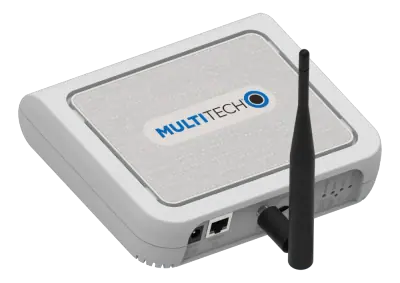
Overview. The RAK Hotspot V2 from RAKwireless is an indoor LoRaWAN gateway in the KR920 version, supplied as a bundle with a 5.8 dBi fiber glass antenna and a 5-meter Pulsar cable.
Main characteristics. The product is built on the Semtech SX1302 LoRa concentrator engine and supports FSK and LoRa modulation. The frequency range is 863 MHz to 870 MHz. Sensitivity is -139 dBm at 125, -136 dBm at 250 and -134 dBm at 500 with spreading factor 12, and output power is 8 dBm at power setting 1.
Interfaces and connectivity. A Gigabit Ethernet port provides wired network connectivity, an external LoRa antenna connector takes the LoRa antenna, and a TF card slot holds the system image and device data. A pairing button and LEDs indicate the operating status.
Power and environment. Power is supplied through USB-C, with a Korean standard power adapter. Typical standby current is 550 mA and the maximum in LoRa Tx mode is 950 mA. The operating temperature range is -10 °C to +55 °C and the storage range is -40 °C to +85 °C.
Typical uses. This indoor version lets the gateway be installed near a window or on a balcony without rooftop access, to take part in the Helium network and Proof-of-Coverage.
Architectures in which A18006 can play a role, derived from its category. This is not a compatibility statement: check the specifications against your requirements.
Energy bills give one total for the whole site. Submetering places meters and current sensors on each circuit or usage and collects their readings through a gateway, so consumption can be followed per building, floor or machine
To check
Number of circuits and phases to meter, and the current range of each
Wired Modbus bus or wireless LoRaWAN, depending on cabling access in the switchboards
Accuracy class required for internal allocation or for billing
Offices and classrooms get stuffy without anyone measuring why. Indoor air quality monitoring places CO2, VOC and particle sensors in the rooms and reports their values through a gateway, so ventilation can be adjusted to real occupancy
To check
Parameters to measure (CO2 alone or CO2, VOC and particles)
Battery-powered sensors or mains-powered sensors with display
Integration with the ventilation control or building management system
A leak under a sink or in a technical room is often found days later. Leak detection places wireless sensors where water can appear and sends an alert through a gateway as soon as one of them gets wet
To check
Locations at risk: kitchens, bathrooms, plant rooms, server rooms
Alert path (SMS, e-mail, application) and who receives it
Battery life and the way a low battery is reported
A fridge that drifts at night can ruin a whole stock. Temperature loggers in cold rooms and trucks report through a gateway or a tracker and raise an alert when a threshold is crossed
To check
Temperature range and accuracy required by the product
Record keeping required by the applicable regulations
A LoRaWAN project needs sensors, gateways, a network server and an application that work together. Sensor nodes report to indoor or outdoor gateways, which forward the data to the network server and the customer’s platform
To check
Regional frequency plan (EU868, US915 and others)
Network server: public, private or embedded in the gateway
A building’s energy, comfort and occupancy data sit in separate systems. Sensors, meters and gateways feed one model of the building, room by room, to compare scenarios and steer the installations
Milesight sensors, LoRaWAN gateways and cellular routers can be brought together on the Milesight Development Platform, which manages the devices and passes their data to other applications through an API and webhooks
To check
Development Platform for device management, API and webhooks, or another network server and application
Devices provisioned through Milesight RPS must have that provisioning removed before being added to the Development Platform
Data flows to the customer’s own application through webhooks
RAKwireless WisGate gateways run WisGateOS 2 and are managed from WisDM, RAKwireless’ cloud device management platform with a built-in network server, alongside RAK sensor nodes, radio modules and concentrators
To check
WisDM built-in network server, or a third-party one (ChirpStack, TTN/TTS, AWS IoT Core, Actility)
Remote configuration and updates of the gateways from WisDM
Regional frequency plan of the gateways and nodes
Associated system blocks
GatewaysSensors and modulesDevelopment boardsMounting
Need a complete solution?
Send a request for A18006 and the other parts of your project.
Similar parts to answer your needs. Compare the main characteristics. A recorded replacement is a documented relation; a similar product is a similarity only, never a compatibility claim.
Current productRAKwireless
A18006
Indoor LoRaWAN gateway KR920 with 5.8 dBi fiber glass antenna
What is recorded about the regulatory status and the life of this part.
Regulatory compliance
No compliance statement is recorded for this part. Ask the supplier for the RoHS and REACH declarations and, for a radio product, the EU declaration of conformity.
No advertising or analytics cookies. A single, strictly necessary cookie is set only if you sign in to your account. Your quote basket and comparison stay in your browser. Details