USB to RS485 Converter
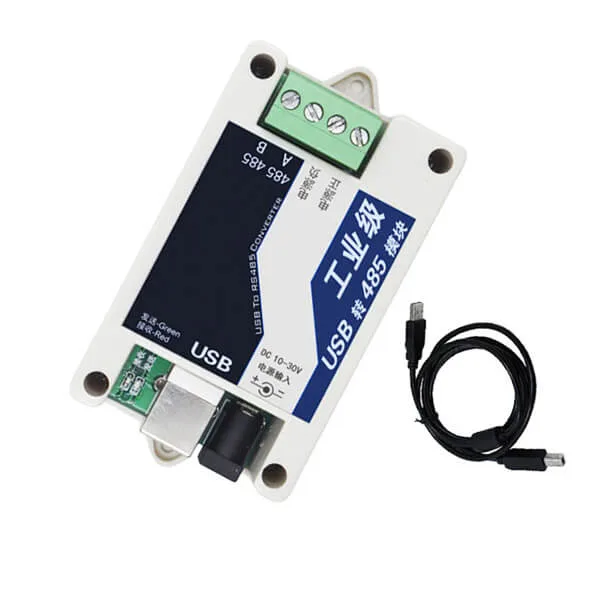
It is an industrial grade converter that extends one RS-485 interface via USB. Enables RS-485 devices to be easily connected to a host computer with a USB interface. The transparent transmission mode provided by the virtual serial port enables the application written for the standard computer serial port to be connected to the RS-485 device without any modification. This USB to rs485 converter price is cheap.
Model: RS-USB-485-3-T
Delivery date: within 24 hours
View - Industrial USB to rs485 converter
The transparent transmission mode provided by the virtual serial port of the USB to 485 converter module enables the application program originally written for the standard computer serial port to be connected to the RS-485 device without any changes.
USB to rs485 converter features
1. USB bus power supply, no external power supply required
2. Compliant with USB2.0 standard, backward compatible
3. Transparent transmission, users do not need to change the agreement
4. Support plug and play plug and play (USB end), communication rate 300-921.6KBPS adaptive
5. Adopt fuse + TVS protection circuit for current and voltage protection, reverse connection protection.
6. RS485 end adopts advanced automatic flow control technology to automatically recognize RS485 signal flow direction
7. The USB-side physical interface is a standard USB socket. A USB cable is included with the product to facilitate connection with the computer, which solves the shortcomings of directly connecting the USB port.
USB to rs485 converter parameters
Standard: Comply with USB2.0 (compatible with USB1.1), EIA RS485 standard
With a two-way communication indicator, it can indicate the status of data receiving and sending, which is convenient for debugging
The driver supports Windows Server 2008 /Windows 7 /Windows Vista /Windows Server 2003 /Windows XP /Windows ME /Windows 98 and other operating systems
RS-485 signal: 485A(+), 485B(-)
Support baud rate range: 2400-19200
Send buffer: 128 Bytes
Receive buffer: 384 Bytes
Working environment: -40℃~85℃, 5%~95%
Load capacity: support up to 200 similar nodes
Transmission distance: 1.5 meters for USB end
Interface mode: USB end interface is female, RS485 end is wiring terminal
Input power: external power supply
After installing the device driver, plug and play
Working mode: Asynchronous half-duplex
FAQ - USB to rs485 converter
Can a computer plug multiple USB to 485?
You can insert more than one, which has been verified by experiment.
Can the serial number of the COM port automatically recognized by the computer be modified? For example, can the COM8 automatically recognized by the computer be modified to COM3?
It can be modified. It can be modified if it does not conflict with the existing COM port that comes with the computer. Specific method: right-click on the “communication port COM?” to be modified—-left click to select “Properties”—-left click to select “port settings”—-left click to select “advanced” — Select the COM port that does not conflict with the computer in the “COM port number”.
The COM port can be recognized in the computer, but it can't communicate?
First, check whether the wiring is correct, it is usually a wiring problem; for USB to 485: If the communication distance is too long, check whether the 120R matching resistance at the beginning and end of the bus is correctly connected, etc.
Sometimes it can be recognized, sometimes the computer can't recognize the conversion cable hardware?
For compatible assembled computers, be sure to plug the conversion cable into the USB port on the back of the motherboard. It may be better for branded computers, but it is also recommended to plug it into the USB port on the back of the motherboard. Notebooks generally do not have this problem.
Where can a USB to rs485 converter be applied?
It is usually used with our rs485 sensor equipment and directly connected to the computer to obtain the value.
Why convert USB to rs485 faults?
1. Data communication failure
Check whether the USB interface is normal, you can try another USB interface or another computer
Check whether the RS485 output interface wiring is correct
Check whether the USB data cable is normal
Check whether the wiring terminals are well connected
Observe whether the red indicator light flashes when receiving data
Observe whether the green indicator light flashes when sending data
2. Data loss or error
Check whether the data communication baud rate, format, etc. are consistent
Check whether the 485A and 485B of USB to 485 are connected to the 485A and 485B of other devices. Make sure that the two terminals with the same name are connected
Other popular sensor
Analog to 485 converter
Smoke alarm
Pir motion sensor
Noise detector
Infrared temperature sensor
Water leak sensor
Water leak detector
Negative ion tester
Related blogs
Vibration Sensor: What, Why, How and Where?
Table of Contents What is a vibration sensor? Vibration sensor is a device that measure the vibration speed and frequency
RS-485 Wiring, Communication and Difference with RS232
Table of Contents The commonly used communication method for data acquisition and control is RS-485. RS-485 is a general communication
Types of Industrial Sensors For Automation
Table of Contents The key to the smart industry lies in the collection of data and information. Sensors are the
8 types of sensors for best Greenhouse Remote Monitoring Systems
A greenhouse is a closed environment that provides optimal conditions for plant growth and promotes plant growth by controlling indoor
Best Environmental Monitoring System
Table of Contents Modern companies are placing an increasing emphasis on the value of collected data. As a result, central
How do Water Leak Detectors Work?
Table of Contents Have you or your friends ever experienced a burst pipe or indoor flooding? Even if you don’t
Best WiFi Temperature Humidity Sensor for Remote Monitoring
Table of Contents If you are away from home, or out on business, keeping an eye on the temperature and
How To Choose Air Quality Monitors In Different Places?
What is an air quality monitor? An instrument used to detect air quality can be called an air quality monitor.
Anemometer: Types, Advantages, Disadvantages
Table of Contents What is an anemometer? An anemometer is a meteorological instrument used to measure air velocity and, in