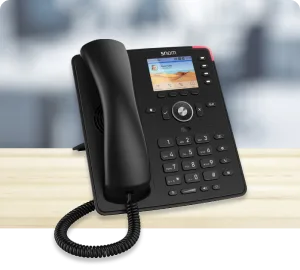
Snom D713
Desk phone
Key features
High-resolution TFT colour display
4 freely programmable function keys
Hands-free operation with HD audio
On-screen labels
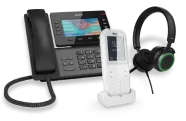
Headset connectable
Technical details >
Documentation >
Purchase options >
The discreet desk phone for every workplace
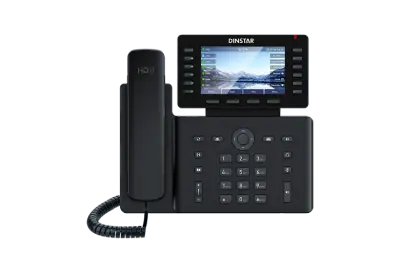
The Snom D713 is the cost-effective entry into the professional world of the Snom D7xx series. Available in black, the phone fits perfectly into any work environment, combining state-of-the-art technology, best HD audio voice quality and current security technology in the usual elegant design.
The high-resolution colour display uses Snom's own labelling solution "SmartLabel" for the 4 freely programmable LED function keys.
The Snom D713 is equipped with a Gigabit switch with PoE support.
In addition, it is possible to connect a headset.
Your browser does not support the video tag.
4 configurable LED function keys
The keys can be assigned functions available on the desk phone, e.g. speed dialling, direct dialling or extension. The multicolouring indicates, for example, the call and presence status of a direct dialling.
High-resolution 2.8" TFT colour display
The high-resolution display offers excellent presentation and visibility in all lighting conditions.
Smart labels bring clarity
Smart Labels are a new and intelligent way of labelling function keys that ensure perfect legibility even on phones with smaller display sizes.
Overview of Series
> Snom D735
Colour: Black
Sensor-based user interface
High-resolution 2.8 “ TFT colour display (6.9cm)
> Snom D735 (W)
Colour: White
Sensor-based user interface
High-resolution 2.8 “ TFT colour display (6.9cm)
> Snom D717
Colour: Black
High-resolution TFT colour display
3 freely programmable function keys (BLF)
> Snom D717 (W)
Colour: White
High-resolution TFT colour display
3 freely programmable function keys (BLF)
> Snom D7 (W)
Colour: White
18 freely programmable, coloured LED buttons
Plug-and-play
> Snom D7C
6.8 “ (17.2 cm) TFT colour screen
Expansion module with 48 (16) programmable buttons
Plug-and-play
Technical features
Gigabit Ethernet
This device has a Gigabit network input and an output (switch) for connecting a computer.
HD audio
This device supports with its hardware and the supported codecs, the highest audio quality.
Headset connectable
This device has a port and possible software support that allows a headset to be connected.
IPv6 & IPv4
This device supports both Internet Protocol version 4 (IPv4) and IPv6.
OpenVPN
This desk phone can be upgraded to an OpenVPN client with an additional firmware upgrade to connect it to an OpenVPN server.
Power over Ethernet (PoE)
This device can receive its power from a connected network cable, provided that the network switch used supports this and has enough power to supply all connected devices.
Security (TLS & SRTP)
This device supports all common security protocols, such as TLS, SIPS, SRTP, etc.
Telephone directory
This device has an integrated phone book.
Compatible Headsets
Compatible Headsets
> Snom A100M
Monaural wideband headset
300° flexible boom
Passive noise cancelling microphone
> Snom A170C
Wireless DECT headset
Connection to Snom phone or PC possible (USB-C)
Passive noise cancelling microphone
Practical example
"How can I connect my phone via OpenVPN..."
To the OpenVPN Guide
keyboard_arrow_right
Help with questions about products, availability and prices
Contact person
Snom HQ Berlin
+49 30 39833-0
Where can you find a Snom partner near you?
You want to buy our products and need advice? Then you have come to the right place.
Which distributor offers the products?
Snom is available all over the world. If you are looking for a wholesaler, you can find here all our partner distributors sorted by country.
Find Distributor
keyboard_arrow_right
Customise desk phones
Make it your phone
Snom desk phones can be highly customised. In addition to being able to customise the phone's user interface (UI), most models can also be physically customised.
UI personalisation - software customisation
For all Snom desk phones with a colour display, screen backgrounds, title and selection bars, and menu structures can be customised in terms of content and colour. In addition, all devices can use individual ringtones.
Corporate branding - changing the hardware
Some phones of the Snom D7xx series can be printed with your own logo. In addition, you can receive almost all devices with individual key labelling and also order any plastic part (housing, handset, telephone cable) in an individual colour.
Learn more
keyboard_arrow_right
Find the right telephone system (PBX).
List of our compatible PBX
If you would like to know whether your desired phone is compatible with the PBX you are using, you can view the on our PBX partner overview page in the Service Hub.
To the comparison list
keyboard_arrow_right
Information on choosing a PBX
Do you need information when choosing a suitable PBX for your desired telephone? We have compiled some tips for you in the guide on what you should look out for.
To the guide
keyboard_arrow_right
Technical data
Everything for Your Product
All essential documents, guides and updates for your product – available in multiple languages.
Close all remove
Expand all add
Firmware & Updates
add
remove
The latest firmware for your Snom device can be found at the link below. When updating, please follow all safety instructions and take into account which firmware version is currently permitted by the PBX you are using.
You may not be able to update your Snom device manually, but only via the web interface of your PBX.
To the firmware update center
keyboard_arrow_right
Technical Documentation
add
remove
Data sheets
Snom D713 Datasheet - DE
download_for_offline
Snom D713 Datasheet - EN
download_for_offline
Snom D713 Datasheet - ES
download_for_offline
Snom D713 Datasheet - FR
download_for_offline
Snom D713 Datasheet - IT
download_for_offline
Snom D713 Datasheet - PL
download_for_offline
Snom D713 Datasheet - PT
download_for_offline
Snom D713 Datasheet - RU
download_for_offline
Snom D713 Datasheet - TR
download_for_offline
Short User Manuals
Snom D713 SUM - DE
download_for_offline
Snom D713 SUM - EL
download_for_offline
Snom D713 SUM - EN
download_for_offline
Snom D713 SUM - ES
download_for_offline
Snom D713 SUM - FR
download_for_offline
Snom D713 SUM - IT
download_for_offline
Snom D713 SUM - PL
download_for_offline
Snom D713 SUM - PT
download_for_offline
Snom D713 SUM - RU
download_for_offline
Snom D713 SUM - TR
download_for_offline
Safety instructions
How To´s, FAQ & Co.
In the Service Hub we have created a variety of instructions and help for you.
To the Service Hub
keyboard_arrow_right
question_answer
Contact
Contact person
keyboard_arrow_left
Contact person
Headquarter Berlin
+49 30 - 39833-0
Office hours: Mo-Fr 9:00-17:00 (CET)
Noemia Domingues
language
Channel Manager France
phone
+33 1 85 83 00 15
mail_outline
Locations
keyboard_arrow_left
Locations
Snom Technology GmbH
Aroser Allee 66
13407 Berlin
www.snom.com
Learn more
keyboard_arrow_right
Contact
keyboard_arrow_left
Contact
Please do not send any support or RMA enquiries here.
You can find help here:
Help Center
local_post_office
Your name
Company
Your email address
Your telephone number
Callback requested
done
If you like, choose one of the options...
I am interested in SRAPS and have questions about it.
I have a project and would like to speak to a sales colleague from Snom.
I need purchase advice on a Snom product (presales)
I need technical advice for the installation of a Snom product (Provided by our partners)
Is this product available?
I would like to become a Snom Partner and have questions.
Where can I buy Snom products?
Your message
done
Thank you for your message. We will answer your request as soon as possible.
warning
Submit
arrow_forward_ios
Privacy policy
Search for help
keyboard_arrow_left
Search for help
Are you looking for help with a problem, a manual, an answer to your question or the latest firmware for your Snom device?
We have set up the Snom Service Hub to provide you with everything you need.
Learn more
keyboard_arrow_right
keyboard_arrow_up
Thank you for visiting the Snom website
Please choose the regional Snom website you would like to visit.
For the United States, Canada, Central and South America:
Snomamericas.com
For the Rest of the World:
snom.com