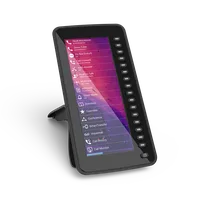
Snom D7C
Expansion module
Key features
6.8 “ (17.2 cm) TFT colour screen
Expansion module with 48 (16) programmable buttons
Plug-and-play
Expandable with up to two additional modules
Technical details >
Documentation >
Purchase options >
The expansion module with high-resolution colour display
The Snom D7C is the expansion module for the phones Snom D785, Snom D765, Snom D735 and Snom D717.
The extension module has a high-resolution colour display with a completely revised user interface.
Connected to a Snom phone via USB plug & play, the Snom D7C expands the phone with another large screen and multiple application possibilities.
With the help of the 16 physical (48 virtual) freely programmable and multi-coloured LED function keys, the status of colleagues can, for example, be quickly recognised and the corresponding number dialled or a call forwarded. If the corresponding line or the LED function line lights up green, the colleague is available and can take a call.
And if you want to have a comprehensive overview, you can connect up to three Snom D7C in series and thus extend the range of functions enormously. Quite simply with plug-and-play via USB. In addition, the power supply runs through the phone via USB.
The configuration of the Snom D7C works either via the existing telephone system or the Snom web interface.
The display of the extension module supports multiple styles and icons and custom background images can even be applied.
The Snom D7C is the colourful and informative extension module for selected phones of the Snom D7xx series.
Your browser does not support the video tag.
48 programmable keys
(16 physical), with multicolour LEDs - The keys can be assigned with all functions available on the Snom phones, e.g. speed dial, direct dial or extension. The multicolour LEDs indicate the call and presence status of a direct dial.
High-resolution 6.8" TFT colour display
The D7C features a high-resolution colour display with a completely redesigned user interface.
Up to 3 expansion packs can be combined
If you need a lot of programmable function keys, the Snom D7C is ideal for you, because you can connect up to 3 in a row to each Snom desk phone.
Overview of Series
> Snom D735
Colour: Black
Sensor-based user interface
High-resolution 2.8 “ TFT colour display (6.9cm)
> Snom D735 (W)
Colour: White
Sensor-based user interface
High-resolution 2.8 “ TFT colour display (6.9cm)
> Snom D717
Colour: Black
High-resolution TFT colour display
3 freely programmable function keys (BLF)
> Snom D717 (W)
Colour: White
High-resolution TFT colour display
3 freely programmable function keys (BLF)
> Snom D713
High-resolution TFT colour display
4 freely programmable function keys
Hands-free operation with HD audio
> Snom D7 (W)
Colour: White
18 freely programmable, coloured LED buttons
Plug-and-play
Technical features
Expansion module connectable
To have additional speed dial or BLF keys available on your desk phone, this device can be supplemented with expansion modules.
Multipage display
The display of the programmable function keys is distributed over several " pages " and can be switched through.
Plug & Play
This device comes with Plug & Play. This means you can use accessories connected via USB without rebooting the phone.
Self-labeling keys in additional display
Unlike in the past, where the freely programmable function keys were labeled by means of paper, this device has labeling in a display.
USB port
This device has at least one USB port.
Help with questions about products, availability and prices
Contact person
Snom HQ Berlin
+49 30 39833-0
Where can you find a Snom partner near you?
You want to buy our products and need advice? Then you have come to the right place.
Which distributor offers the products?
Snom is available all over the world. If you are looking for a wholesaler, you can find here all our partner distributors sorted by country.
Find Distributor
keyboard_arrow_right
Find the right telephone system (PBX).
List of our compatible PBX
If you would like to know whether your desired phone is compatible with the PBX you are using, you can view the on our PBX partner overview page in the Service Hub.
To the comparison list
keyboard_arrow_right
Information on choosing a PBX
Do you need information when choosing a suitable PBX for your desired telephone? We have compiled some tips for you in the guide on what you should look out for.
To the guide
keyboard_arrow_right
Technical data
Downloads
Close all remove
Expand all add
Firmware
add
remove
The latest firmware for your Snom device can be found at the link below. When updating, please follow all safety instructions and take into account which firmware version is currently permitted by the PBX you are using.
You may not be able to update your Snom device manually, but only via the web interface of your PBX.
To the firmware update center
keyboard_arrow_right
Documentation
add
remove
Data sheets
Snom D7C Datasheet - DE
download_for_offline
Snom D7C Datasheet - EN
download_for_offline
Snom D7C Datasheet - FR
download_for_offline
Snom D7C Datasheet - ES
download_for_offline
Snom D7C Datasheet - IT
download_for_offline
Snom D7C Datasheet - TR
download_for_offline
Snom D7C Datasheet - PL
download_for_offline
Snom D7C Datasheet - RU
download_for_offline
Manuals & Co.
Further documentation
keyboard_arrow_right
Everything for Your Product
All essential documents, guides and updates for your product – available in multiple languages.
Close all remove
Expand all add
Firmware & Updates
add
remove
The latest firmware for your Snom device can be found at the link below. When updating, please follow all safety instructions and take into account which firmware version is currently permitted by the PBX you are using.
You may not be able to update your Snom device manually, but only via the web interface of your PBX.
To the firmware update center
keyboard_arrow_right
Technical Documentation
add
remove
Data sheets
Snom D7C Datasheet - DE
download_for_offline
Snom D7C Datasheet - EL
download_for_offline
Snom D7C Datasheet - EN
download_for_offline
Snom D7C Datasheet - ES
download_for_offline
Snom D7C Datasheet - FR
download_for_offline
Snom D7C Datasheet - IT
download_for_offline
Snom D7C Datasheet - PL
download_for_offline
Snom D7C Datasheet - PT
download_for_offline
Snom D7C Datasheet - RU
download_for_offline
Snom D7C Datasheet - TR
download_for_offline
Short User Manuals
Safety instructions
How To´s, FAQ & Co.
In the Service Hub we have created a variety of instructions and help for you.
To the Service Hub
keyboard_arrow_right
question_answer
Contact
Contact person
keyboard_arrow_left
Contact person
Headquarter Berlin
+49 30 - 39833-0
Office hours: Mo-Fr 9:00-17:00 (CET)
Noemia Domingues
language
Channel Manager France
phone
+33 1 85 83 00 15
mail_outline
Locations
keyboard_arrow_left
Locations
Snom Technology GmbH
Aroser Allee 66
13407 Berlin
www.snom.com
Learn more
keyboard_arrow_right
Contact
keyboard_arrow_left
Contact
Please do not send any support or RMA enquiries here.
You can find help here:
Help Center
local_post_office
Your name
Company
Your email address
Your telephone number
Callback requested
done
If you like, choose one of the options...
I am interested in SRAPS and have questions about it.
I have a project and would like to speak to a sales colleague from Snom.
I need purchase advice on a Snom product (presales)
I need technical advice for the installation of a Snom product (Provided by our partners)
Is this product available?
I would like to become a Snom Partner and have questions.
Where can I buy Snom products?
Your message
done
Thank you for your message. We will answer your request as soon as possible.
warning
Submit
arrow_forward_ios
Privacy policy
Search for help
keyboard_arrow_left
Search for help
Are you looking for help with a problem, a manual, an answer to your question or the latest firmware for your Snom device?
We have set up the Snom Service Hub to provide you with everything you need.
Learn more
keyboard_arrow_right
keyboard_arrow_up
Thank you for visiting the Snom website
Please choose the regional Snom website you would like to visit.
For the United States, Canada, Central and South America:
Snomamericas.com
For the Rest of the World:
snom.com