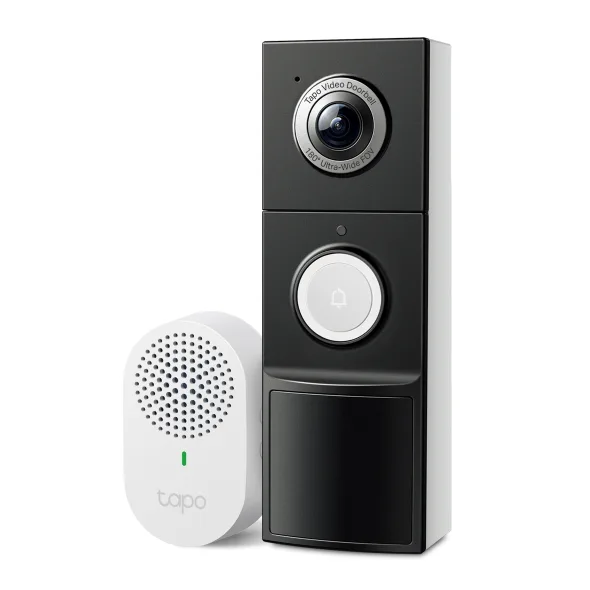
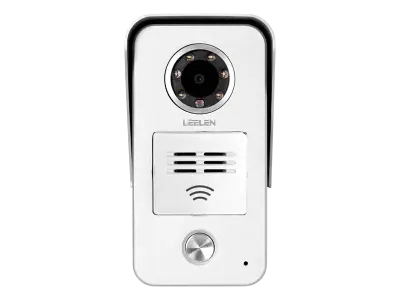
Tapo Video Doorbell Camera
Tapo D235
180° Ultra-Wide View: Captures visitors, deliveries, and your entire front yard in one frame.
Every detail in 2K Clarity: Sharp 2K video captures the crucial moments on your doorstep, day and night.
Power it your way: Go wire-free for up to 8 months on a charge, or hardwire it for around-the-clock monitoring.
Nothing missed before the action: Pre-roll footage adds up to 4 seconds of video from just before motion’s detected, so you see the full story.
Smart alerts, no monthly fees: On-device AI tags people, packages, and vehicles in frame, without a subscription.
Round-the-clock recording when wired: Hardwired mode gives you uninterrupted 24/7 recording for a complete record of activity.
See in full color after dark: Built-in spotlights deliver full-color night vision, so faces, vehicles, and clothing stay clear at night.
Answer the door from your phone: Doorbell Call rings your phone the moment a visitor is there, so you can respond without opening the app.
Respond or tap for a quick reply: Use clear two-way audio, or send a prerecorded response when you can’t talk.
Keep footage free or in the cloud: Save up to 512 GB to a microSD card at no extra cost, or use cloud storage with Tapo Care.
Learn more about mircroSD card compatibility
Smart.Secure.Easy.
Always Know Who’s There
Video Doorbell Camera
Tapo D235
Hardwire & Battery
Power Supply
Chime
Included
IP66 Water &
Dust Resistance
2K 5MP
Live View + Starlight Sensor
Head-to-Toe
4:3 /180° filed of View 140°
Wire-Free &
Hardwire Supported 7 Month
Local and Cloud Storage up to 512 GB
Smart AI Detection
Person / Pet / Vehicle / Package
Flexible Reply Ways
Anti-Theft Alarm
Activity Zone
2K 5MP Head-to-Toe 180° DFOV
Details matter, and with 2K 5MP clarity, Tapo D235 exceeds traditional Full HD resolution with finer details and incredible clarity. Experience the full picture with our 180° ultra-wide field of view, capturing every detail from head to toe in a single sweeping glance.
160°
Others brand
180°
Tapo D235
180° ultra-wide
Head-to-Toe View
2K 5MP
Various Power Supply Methods
Wire-Free with battery
The rechargable battery* can largely extends your usage and gives you flexiblity to place it anywhere you needed.
7 Month
*The time of use includes recording and watching live views. Actual battery life may vary due to device settings, usage, router specifications, and environmental factors.
Hardwire Supported
Never miss a moment with hardwired, continuous 24/7 video recording.***
24/7
Continuous Recording
***This mode dose not support existing chime use.
Flexible Wedges, Flexible Views
Different wedge choices give users possibilities to make the doorbell suits more placement scenarios. Users can also use these wedges to adjust the views.
Local and Cloud Storage
Up to
512 GB
Smart AI Detection and Notification
Smart AI identifies people, pets, vehicles, and packages, notifying users as needed.
Person
Detection
Pet
Detection
Vehicle
Detection
Package
Detection
Flexible Reply Ways
With voice changer two-way audio or a recorded quick response, communicate directly with your deliveries through the Tapo app.
Flexible Reply Ways
With voice changer two-way audio or a recorded quick response, communicate directly with your deliveries through the Tapo app.
Two-Way Audio
Customizable Quick Respones
Hello? Your package arrived.
Two-Way Audio
Customizable Quick Respones
Indoor Chime Provided
Choose from a variety of ringtones to get alerted immediately when you are at home.
Anti-theft Alarm
Be alerted when someone trying to take the doorbell off with anti-theft alarm function.
Activity Zones
Notifies you when activity is detected in specific zones.
Voice Activated
Works with Alexa and Google Assistant to see what the doorbell sees on a supported device.
Install Your Doorbell
Step 1
Option 1: Stick to the wall
Attach the included adhesive to the back of the bracket or the wedge you have selected. If you use the wedge, affix the bracket and the wedge with screws.
3M Adhesive
Mounting Wedge
Route the wires through the bracket (if there are existing wires). Wipe off the dust from the surface using a dry cloth, stick the bracket with adhesive to the smooth wall, and press it down for 15 seconds to ensure the bracket is firmly attached.
Step 1
Option 2: Mount to the wall
Route the wires (if there are existing wires) through the mounting template and stick the template. Drill two holes where indicated.
Φ=6 mm (15/64 in.)
Route the wires (if there are existing wires) through the bracket. Insert two anchors into the holes and use the screws to affix the bracket over the anchors.
Step 2
Mount the doorbell to the bracket
Option 1: Battery Powered
Mount the doorbell to the bracket.
Option 2: Hardwire Powered
Connect the wires to the doorbell and tighten the screws. Mount the doorbell to the bracket and turn on the circuit breaker.
If the wires are too short
Step 1
Option 1: Stick to the wall
Attach the included adhesive to the back of the bracket or the wedge you have selected. If you use the wedge, affix the bracket and the wedge with screws.
3M Adhesive
Mounting Wedge
Route the wires through the bracket (if there are existing wires). Wipe off the dust from the surface using a dry cloth, stick the bracket with adhesive to the smooth wall, and press it down for 15 seconds to ensure the bracket is firmly attached.
Option 2: Mount to the wall
Route the wires (if there are existing wires) through the mounting template and stick the template. Drill two holes where indicated.
Φ=6 mm (15/64 in.)
Route the wires (if there are existing wires) through the bracket. Insert two anchors into the holes and use the screws to affix the bracket over the anchors.
Step 2 Mount the doorbell to the bracket
Option 1: Battery Powered
Mount the doorbell to the bracket.
Option 2: Hardwire Powered
Connect the wires to the doorbell and tighten the screws. Mount the doorbell to the bracket and turn on the circuit breaker.
If the wires are too short
*7-month battery life is based on TP-Links laboratory testing with 300 seconds per day use. The time of use includes recording and watching live views. Actual battery life may vary due to device settings, usage, router specifications, and environmental factors.
*** This mode does not support existing chime use.
Compatible with Alexa and Google Assistant supported displays. User experience is dependent on the connected services.
The app UI is for reference only.