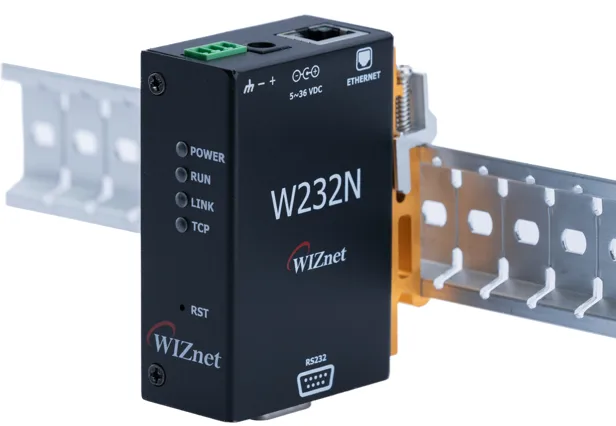
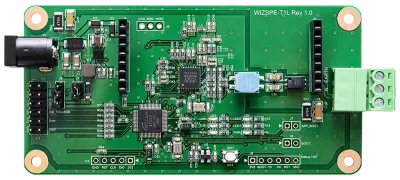
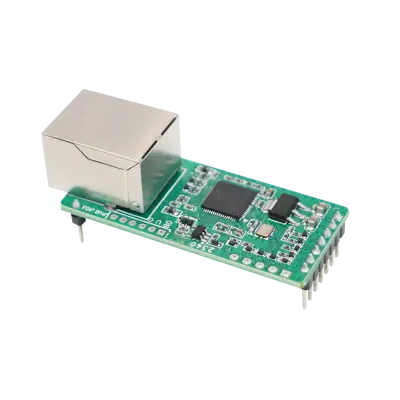
The WIZnet W232N is an industrial Ethernet to RS232 converter that connects a serial device to an Ethernet network, converting Modbus TCP to RTU or ASCII.
Command Manual — Guide to main commands and usage — -EN
Configuration Tool Manual — How to use the configuration tool — -EN
Datasheet — Technical specifications — EN; 한국어EN 한국어
Factory Reset Guide — A factory reset will return the settings on the W232N to their factory state — -EN
Modbus Connection Guide — How to connect and use Modbus protocolEN
MQTT Connection Guide — How to set up and use MQTT communicationEN
Product overview
Overview. The WIZnet W232N is an industrial-grade serial-to-Ethernet converter designed to connect a device with an RS232 link to an Ethernet network. It performs protocol conversion, including Modbus TCP to Modbus RTU or ASCII.
Main characteristics. The module provides one UART port up to 230 kbps and a 10/100 Mbps Ethernet interface. It supports TCP server, TCP client, TCP mixed and UDP modes, as well as SSL TCP client. Modbus RTU/ASCII is available only in TCP server mode.
Interfaces and connectivity. The RS232C port uses a D-SUB9 connector and accepts AT commands. The module supports MQTT and MQTTS for IoT, HTTP, HTTPS and CoAP, as well as custom protocols on request. It is configurable with a configuration tool, with commands, and through a web server.
Power and environment. The accepted power input is 5 to 36 V. The operating temperature range is -25 to 80 °C according to the industrial specifications, and the module mounts on DIN rail (DIN 46277). It is protected against ESD.
Typical uses. The W232N allows existing serial equipment, such as PLCs or instruments communicating in Modbus RTU, to be connected to an Ethernet network without changing their hardware. It suits industrial installations requiring secure communication over SSL/TLS.
Certifications. The product is KC and FCC certified.
No published question about this part yet. Questions are reviewed before publication.
Complete specifications
Every characteristic recorded for W232N, with where it comes from. Use the filters to find one quickly.
All specifications (8)
Characteristic
Value
Command Manual — Guide to main commands and usage — -
EN
Configuration Tool Manual — How to use the configuration tool — -
EN
Datasheet — Technical specifications — EN; 한국어
EN 한국어
Factory Reset Guide — A factory reset will return the settings on the W232N to their factory state — -
EN
Modbus Connection Guide — How to connect and use Modbus protocol
EN
MQTT Connection Guide — How to set up and use MQTT communication
EN
SSL Connection Guide — How to configure secure SSL connections
EN
Web Server Configuration Guide — Web-based configuration guide — -
EN
No specification matches.
Last verification : 2026-11-03
Technical documentation
Official documents and the technical data recorded for W232N. For a missing document or a specific revision, our experts send it to you.
1. Technical overview
The WIZnet W232N is an industrial Ethernet to RS232 converter that connects a serial device to an Ethernet network, converting Modbus TCP to RTU or ASCII.
Command Manual — Guide to main commands and usage — -EN
Configuration Tool Manual — How to use the configuration tool — -EN
Datasheet — Technical specifications — EN; 한국어EN 한국어
Factory Reset Guide — A factory reset will return the settings on the W232N to their factory state — -EN
Modbus Connection Guide — How to connect and use Modbus protocolEN
2. Datasheet extract (recorded values)
Parameter
Value
Command Manual — Guide to main commands and usage — -
EN
Configuration Tool Manual — How to use the configuration tool — -
EN
Datasheet — Technical specifications — EN; 한국어
EN 한국어
Factory Reset Guide — A factory reset will return the settings on the W232N to their factory state — -
EN
Modbus Connection Guide — How to connect and use Modbus protocol
EN
MQTT Connection Guide — How to set up and use MQTT communication
EN
SSL Connection Guide — How to configure secure SSL connections
EN
Web Server Configuration Guide — Web-based configuration guide — -
EN
Technical FAQ
Answers to the questions that the recorded characteristics of W232N can answer. A question is not asked when nothing is recorded to answer it.
1Does it support Modbus?
Yes — recorded under "Modbus Connection Guide — How to connect and use Modbus protocol": EN.
Similar parts to answer your needs. Compare the main characteristics. A recorded replacement is a documented relation; a similar product is a similarity only, never a compatibility claim.
Current productWIZnet
W232N
Industrial Ethernet to RS232 converter with Modbus TCP/RTU support
Command Manual — Guide to main commands and usage — -
EN
Configuration Tool Manual — How to use the configuration tool — -
EN
Datasheet — Technical specifications — EN; 한국어
EN 한국어
Factory Reset Guide — A factory reset will return the settings on the W232N to their factory state — -
What is recorded about the regulatory status and the life of this part.
Regulatory compliance
No compliance statement is recorded for this part. Ask the supplier for the RoHS and REACH declarations and, for a radio product, the EU declaration of conformity.
No advertising or analytics cookies. A single, strictly necessary cookie is set only if you sign in to your account. Your quote basket and comparison stay in your browser. Details