PIM369
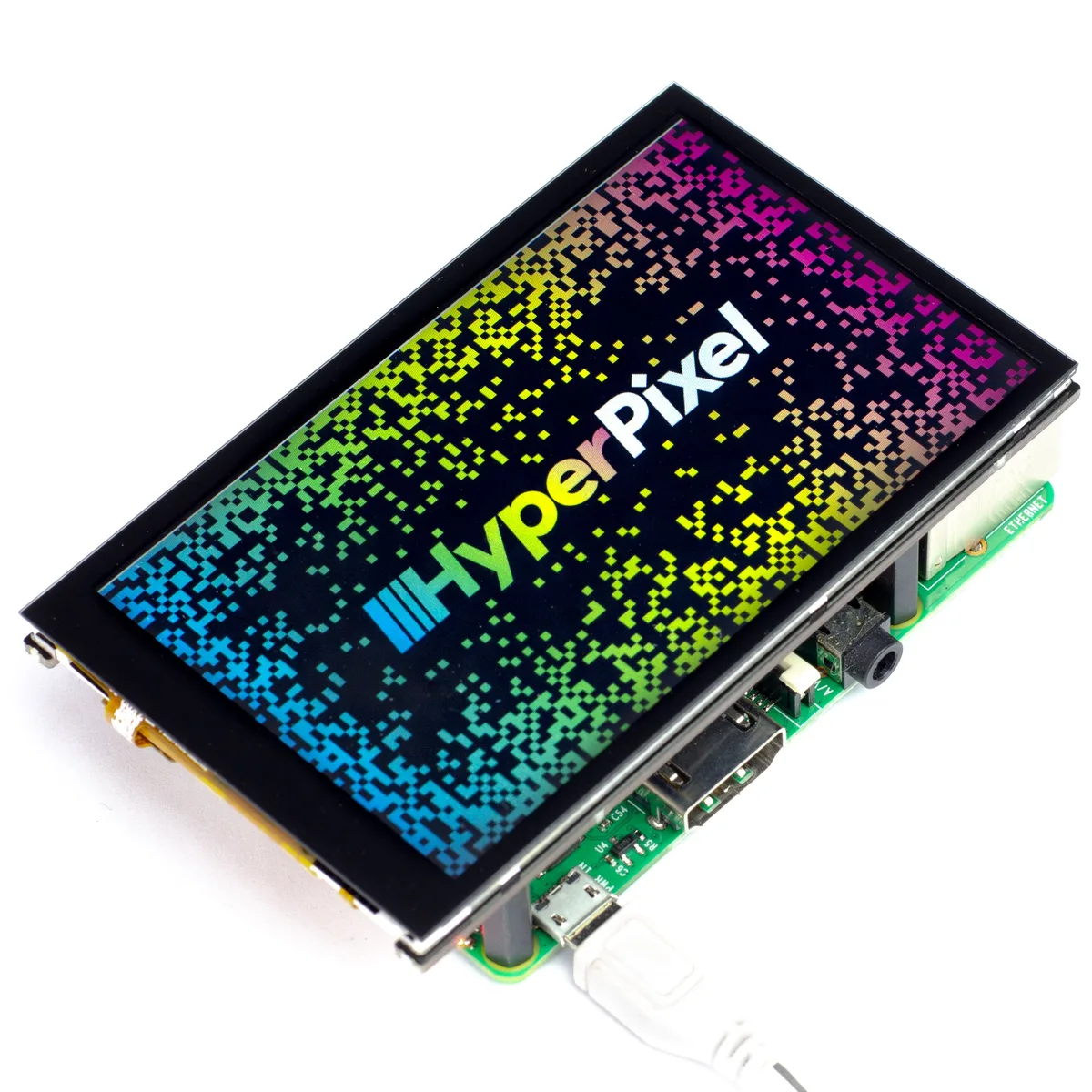
HyperPixel 4.0 - Hi-Res Display for Raspberry Pi
- Contrast Ratio
- 500:1
Limited record: this part has neither specifications nor a datasheet in the catalog yet. It is shown for reference and is not indexed.
HyperPixel 4.0 - Hi-Res Display for Raspberry Pi
Maker, Prototyping, Open-Hardware & Developer Boards
Pimoroni PIM369, listed under “Maker, Prototyping, Open-Hardware & Developer Boards”.
A high-resolution, high-speed 4.0" TFT display for your Raspberry Pi with optional capacitive multi-touch!
HyperPixel 4.0 is the perfect way to use your Pi without a bunch of cables or a bulky display. Design your own interface to control your project, display data, or turn your Pi into a tiny media centre.
This new version of HyperPixel has a gorgeous IPS display, with wide viewing angles, custom-made cover glass (on the touch version), and the alternate I2C interface is broken out for advanced users.
It's available in touch and non-touch versions, depending on your preference.
Features
High-speed DPI interface
4.0" IPS (wide viewing angle, 160°) display (86.4x51.8mm)
800x480 pixels (~235 PPI)
18-bit colour (262,144 colours)
60 FPS frame rate
Contrast ratio: 500:1
Capacitive touch*
40-pin booster header included
Standoffs included to securely attach to your Pi
Compatible with all 40-pin header Raspberry Pi computers
*Only on Touch version
HyperPixel uses a high-speed DPI interface, allowing it to shift 5x more pixel data than the usual SPI interface that these small Pi displays use. It has a 60 FPS frame rate and a resolution of approximately 235 pixels per inch ( 800x480 ) on its 4.0" display. The display can show 18-bits of colour (262,144 colours).
The Touch version has a capacitive touch display that's more sensitive and responsive to touch than a resistive touch display, and it's capable of multi-touch!
Everything comes fully-assembled, and there's no soldering required! The display is securely stuck down to the HyperPixel 4.0 PCB and connected via a neat little flush-mounting FPC cable.
Please note: when installing HyperPixel 4.0 onto your Pi make sure not to press down on the screen surface! Hold the board by its edges and wiggle it to mate with the extended header (or GPIO header). Also take care not to pull on the edges of the glass display when removing your HyperPixel.
It'll work with any 40-pin version of the Pi, including Pi Zero and Pi Zero W. If you're using it with a larger Pi then use the extra 40-pin header that's included to boost it up to the required height. If you're using a Zero or Zero W then just pop it straight onto the GPIO.
The included standoff kit allows you to mount your HyperPixel 4.0 safely and securely to your Pi. Just screw them into the posts on the underside of the HyperPixel 4.0 PCB and then secure with screws through the mounting holes on your Pi.
Software
If you're using a recent version of Raspberry Pi OS (Bullseye or later) then you'll need to use the built in kernel drivers - just add the following line to the end of your boot/firmware/config.txt (and then reboot):
dtoverlay=vc4-kms-dpi-hyperpixel4
You will need to have I2C disabled ( sudo raspi-config nonint do_i2c 1 ) along with any other interfaces that use the GPIO.
If you need to rotate the display you can do this using the graphical Screen Configuration utility - find it under Preferences > Control Centre > Screens in Raspberry Pi OS Trixie. This should rotate the touch too, though it might require a restart.
⚠ The screen backlight will not automatically turn off when you shut down / power off your Pi. We'd suggest unplugging the power cable from your Pi (or turning off your power supply at the socket) when you're not using it to ensure longevity of the screen.
More info about kernel drivers
GitHub repository (and legacy installer)
Using Hyperpixel with OctoPrint or Octodash by Lost In Tech
Notes
Dimensions: 58.5x97x12mm (WxHxD, depth includes header and display).
HyperPixel uses basically all of the GPIO pins to communicate with the Pi (including the standard I2C pins) so it's not generally possible to use it with other HATs and devices that connect via the GPIO...
...but we have provided an alternate I2C interface broken out on the back that will let you use I2C devices (like sensor breakouts) at the same time as HyperPixel. Check out this forum post for more info!
Dimensional drawing (Touch version, but the board size and connector locations are the same on the non-touch variant).
No published question about this part yet. Questions are reviewed before publication.
Every characteristic recorded for PIM369, with where it comes from. Use the filters to find one quickly.
| Characteristic | Value |
|---|---|
| Contrast Ratio | 500:1 |
No specification matches.
Last verification : 2026-11-04
Official documents and the technical data recorded for PIM369. For a missing document or a specific revision, our experts send it to you.
Pimoroni PIM369, listed under “Maker, Prototyping, Open-Hardware & Developer Boards”.
| Parameter | Value |
|---|---|
| Contrast Ratio | 500:1 |
Similar parts to answer your needs. Compare the main characteristics. A recorded replacement is a documented relation; a similar product is a similarity only, never a compatibility claim.
HyperPixel 4.0 - Hi-Res Display for Raspberry Pi
Sensor Adapter for Click, QWIIC and Grove Modules
RS485 Module 3PEAK TP8485E
4-20mA Module STMicroelectronics LM2902
Describe your application and constraints in a request.
What is recorded about the regulatory status and the life of this part.
No compliance statement is recorded for this part. Ask the supplier for the RoHS and REACH declarations and, for a radio product, the EU declaration of conformity.
| Current status | Status not stated |
| Key dates | Not recorded |
| Manufacturer part number | PIM369 |
| Manufacturer | Pimoroni |
Maker, Prototyping, Open-Hardware & Developer Boards
M12 fisheye lens for camera module · Ref. : M12_FISHEYE
Price on request
Maker, Prototyping, Open-Hardware & Developer Boards
RK3568 System-on-Module with 1 TOPS NPU
Price on request
Maker, Prototyping, Open-Hardware & Developer Boards
RK3568 Android tablet mainboard with DTV tuner · Ref. : K3-3568
Price on request
Maker, Prototyping, Open-Hardware & Developer Boards
Boost converter module 3.3 V to 12 V 50 mA · Ref. : 110155
Price on request
No advertising or analytics cookies. A single, strictly necessary cookie is set only if you sign in to your account. Your quote basket and comparison stay in your browser. Details